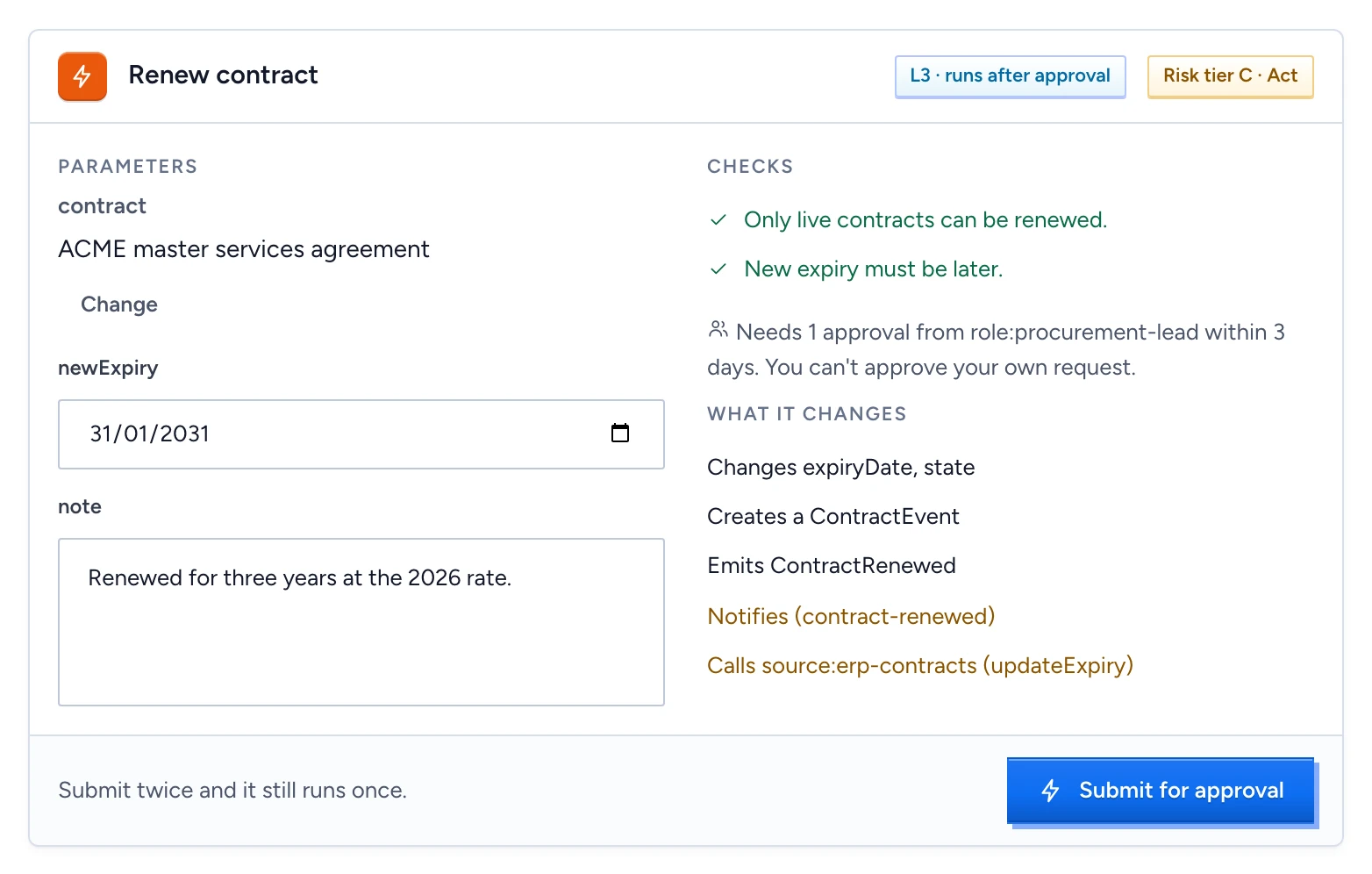
Chat can change things as well as answer questions: renew a contract, update a record, notify an owner. Gluon offers an action only when your question asks for one, such as "renew contract C-1001 until 31 January 2031". Text inside a document or an uploaded file never triggers one. Before anything runs, you see a card with exactly what will change, and a named approver sees the same change before they decide.
Read the action card
The card's header shows the action and two badges:
- Autonomy, from L0 to L4. At L3 · runs after approval and L4 · bounded automatic, the action runs once its checks pass and any approval its rule asks for is given. At L0 to L2, nothing runs from chat: the card records a proposal for a person to carry out. The level is the lowest of what the action, the Capability and the deployment allow, and a High impact action (risk tier D) never goes above L2.
- Risk tier, from A to D: Assist, Advise, Act, High impact.
Below that:
- Parameters: the values the action will use. An object shows by the name people know it by, with Change if you may pick another. Required fields you have not filled are listed in the footer.
- Checks: the action's preconditions, each passing or failing, for example "New expiry must be later." Any failing check disables the button.
- The approval rule: "Needs 1 approval from role:procurement-lead, never yourself, within 3 days."
- What it changes: the properties it sets, the objects it creates, the events it emits, and in amber the effects outside Gluon, such as a notification or a call to the ERP.
Submit it
Fill in the missing values, then select the button. It reads Record proposal, Submit for approval or Run, depending on the level. Submitting twice creates one run, so a double click or a retry is safe. The card then shows the run's state, for example Waiting for approval: "Nothing has run yet. You will be told when the approver decides."
You are also told when the run is rejected, edited by an approver, voided or expired.
Decide an approval
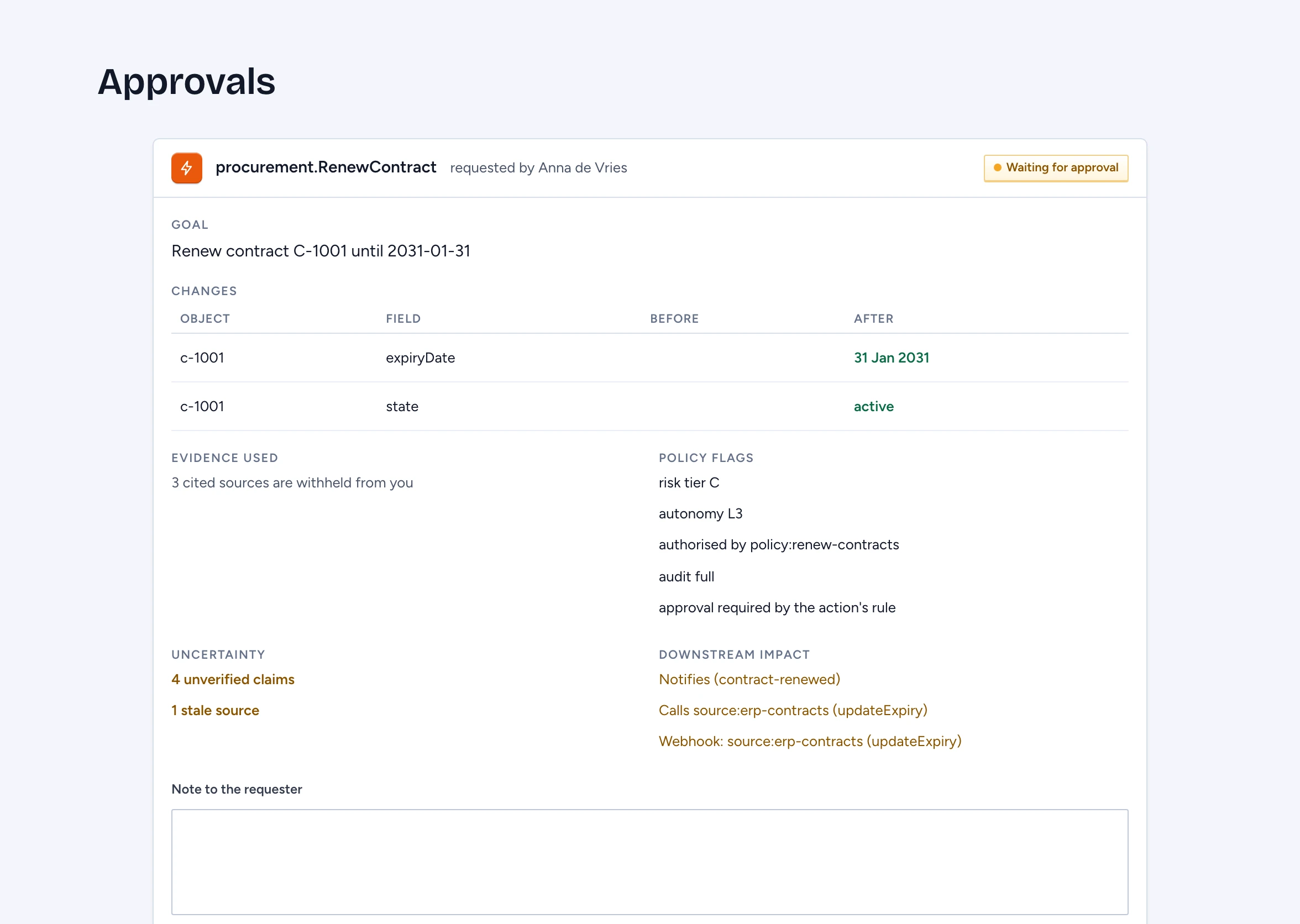
Approvers get a notification, "An action is waiting for your approval", and find it under Approvals at the bottom of the chat sidebar, which shows how many decisions wait for you. The decision packet shows:
- Goal: what the requester asked for.
- Changes: each object and field, Before and After.
- Evidence used: the cited sources, or how many are withheld from you.
- Policy flags: risk tier, autonomy, the authorising policy and why approval is required.
- Uncertainty: unverified claims and stale sources in the answer that led here.
- Downstream impact: notifications, calls and webhooks the run will send.
Then decide:
- Approve to let the run go ahead. With a quorum above one, it waits for the rest.
- Reject, with a Note to the requester saying why. The note is required.
- Escalate, with a note, to send it to the owners of the target type.
- Edit to correct a parameter, then Approve edited. Gluon checks the new values as if the requester had submitted them. You cannot change the target object, and approvals given before the edit stop counting.
You never approve your own run. An approval is bound to the parameters, the target object's current revision and the action's definition. If any of them changes before you approve, Gluon voids the run and tells the requester. A kill switch on the action or its Capability voids it too.