A deployment is how a published version reaches people. Segments, capabilities and approvers show their titles with the reference underneath, such as "Core and parties" over segment:core-party. It names the version, the segments of the ontology it serves, the Capabilities a client may bind to, the audiences who get it, the channels they reach it on and the stages it rolls out in. A version that no deployment reaches serves nobody.
Run the deploy wizard
Open Deployments in the designer and press New deployment. You need the deploy permission and at least one published version; without one the wizard says "Nothing is published yet. Publish main from Versions first." The wizard has five steps, and Next stays disabled until the current step is complete.
- Version. Name the deployment in kebab case, for example
procurement-emea-prod, and pick an exact published version. - Segments. Choose the segments of the ontology the audiences get and the Capabilities a client may bind to.
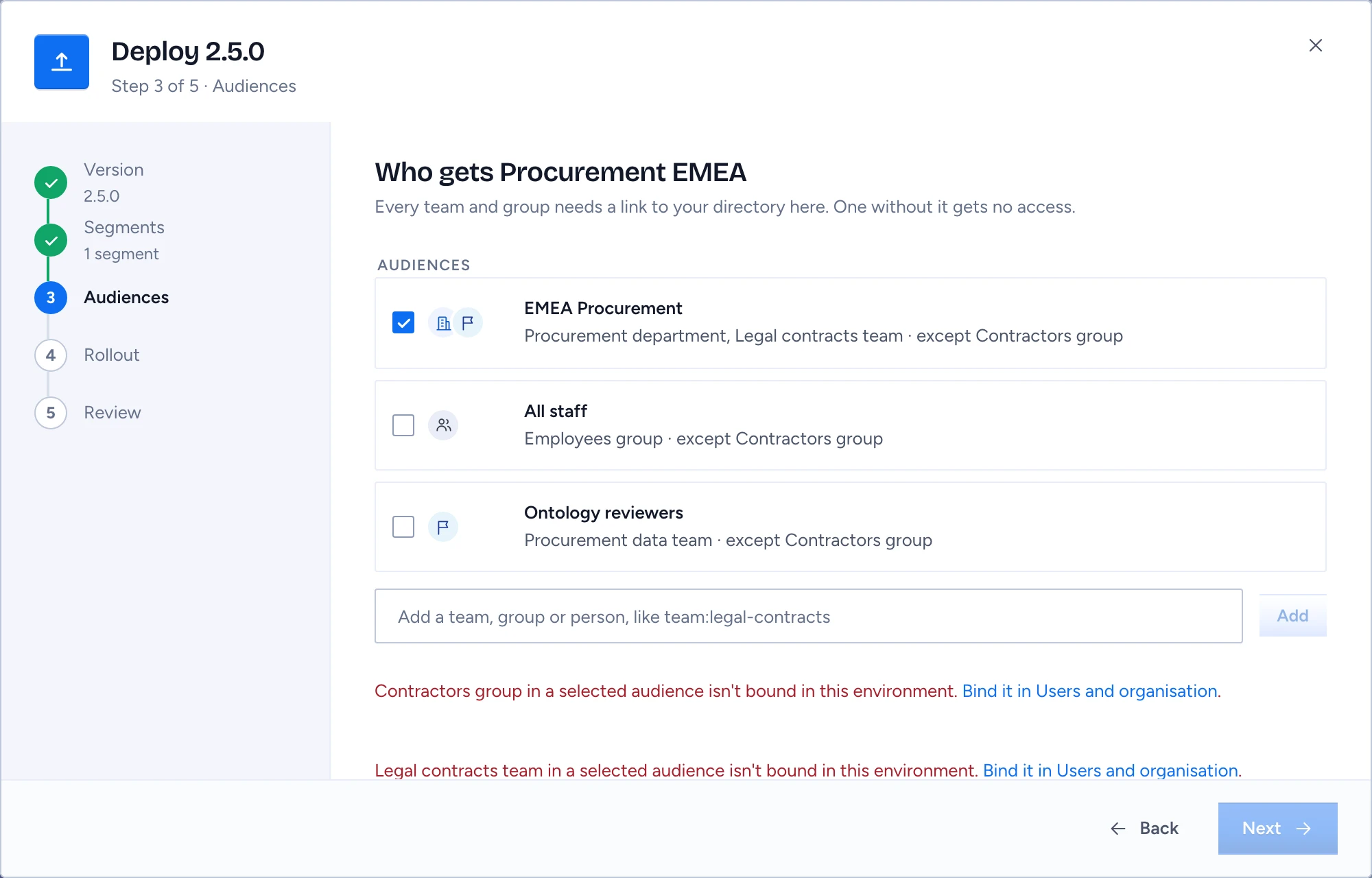
- Audiences. Each audience shows its title, round tiles for who is in it (a building for a department, a flag for a team, people for a group, a person), and its members and exceptions in words, for example "Procurement department, Legal contracts team · except Contractors group". Tick the audiences, or type a team, group or person such as
team:legal-contractsand press Add. Then choose the channels: Chat, Apps, API, MCP and Desktop, each with the glyph it has everywhere in Gluon. - Rollout. Tick at least one role under Approvers, at the top of the step: Next stays off until you do. Keep Start with a shadow stage on, pick a Soak, and optionally a Pilot audience and a Not before time.
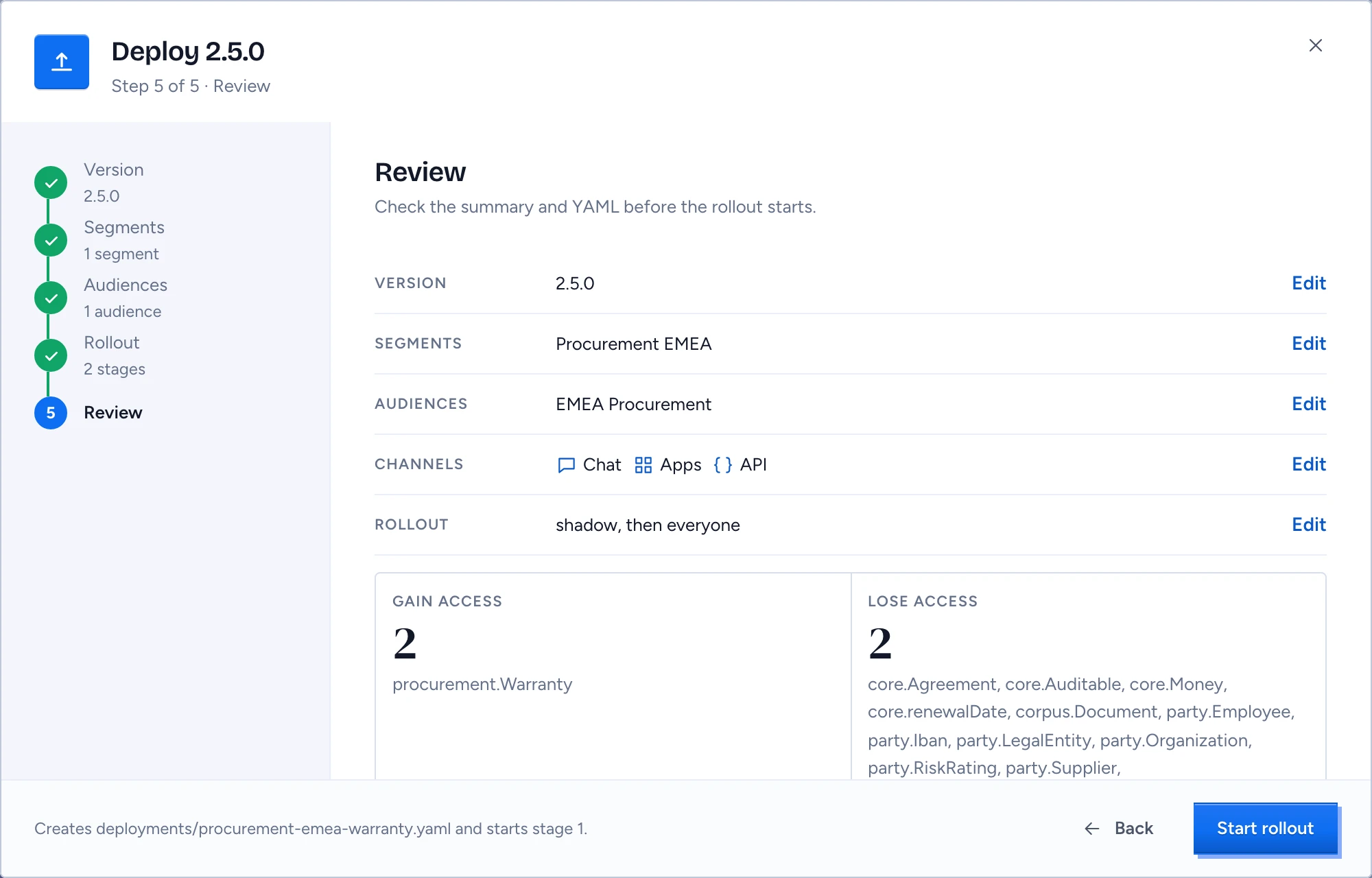
- Review. Check the summary, the access change and the Deployment YAML, then press Start rollout.
Gluon writes deployments/<name>.yaml and starts stage 1.
Bind every audience first
Audiences are logical principals. Each environment binds them to real directory groups, teams and people. The Audiences step lists every principal without a binding in this environment in red, including one nested inside an audience you ticked, with a Bind it in Users and organisation link. The step stays blocked until each one is bound or removed, because an unbound principal would fail closed and serve nobody.
Choose the rollout
The wizard builds up to three stages: shadow, the pilot audience, then everyone.
- The shadow stage is scored and shown to nobody, and gives the gates their first evidence.
- Soak is how long each stage runs before it may widen: "Three days shadow, two days pilot", "One hour each", or "No soak (gates only)".
- Pilot audience adds a first live stage for one audience. "No pilot, go to everyone" skips it.
- Not before holds the rollout until that time.
Read the access change
The Review step shows Gain access and Lose access: how many people gain or lose access and the types involved, comparing what every active user sees now with what they will see once the deployment reaches every audience it names.
Read the lose count carefully the first time you deploy in an environment. Until then, serving follows the package's own Deployment files, and your first rollout replaces them. People those files served lose access unless your deployment covers them, and the review step says so in one line.
When the deployment overlaps a live one on the same segments, the wizard warns: "Overlaps procurement-emea (2.4.0). The newer live version applies where both reach someone."
Get the deployment approved
If you hold every approver role you ticked, the rollout starts at once. Otherwise the deployment shows Waiting for approval with the roles still needed. Each approver opens it and presses Approve deployment, which needs the review permission, and the last approval starts the rollout.