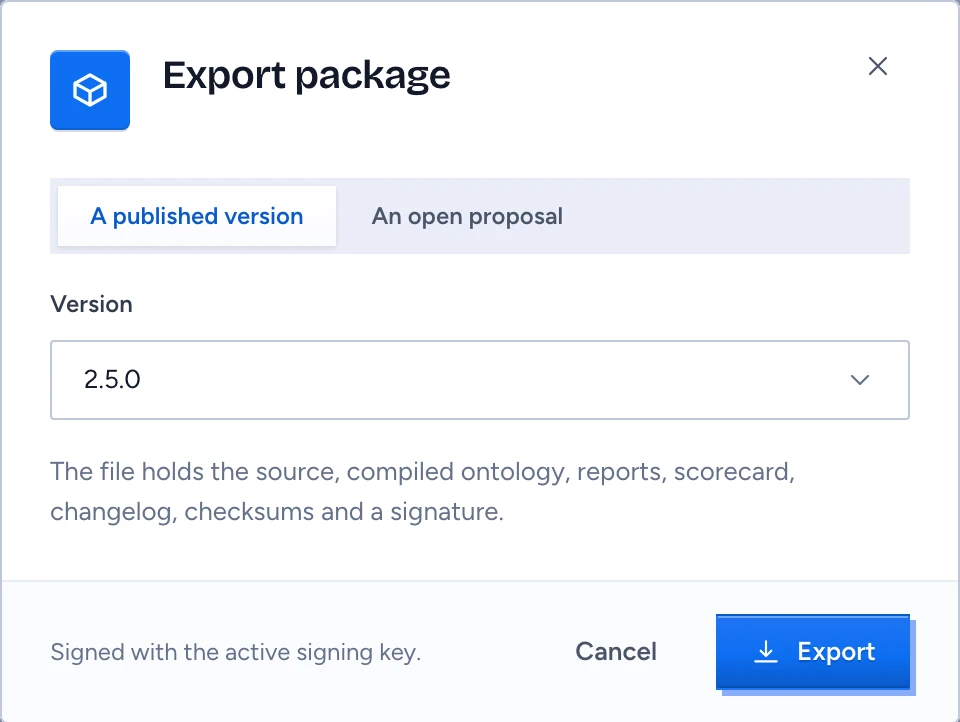
A package is the whole ontology in one signed .gluonpkg file. You export a published version in one environment and import it in another, for example from acceptance into production, or from a partner's tenant into yours. An import lands as a proposal, so it goes through the same review, publish and deploy steps as any other change.
What a package holds
manifest.json, with the signer's key id and public key;src/, the GOL files;compiled/ontology.jsonandcompiled/schema/: a JSON Schema per object type, an OpenAPI 3.1 document and the MCP tool list;- the validation and compatibility reports;
- the latest scorecard with its golden results, when an evaluation run exists;
CHANGELOG.md,checksums.sha256andsignature.sig.
A package carries definitions only. Records, people and directory bindings stay in their environment, and principals such as team:legal-contracts are bound again wherever the package lands. The quotes behind mined suggestions stay in the inbox of the environment that received them.
Set up a signing key
Packages are signed with Ed25519 by the tenant's active signing key. Keys need the manage-security permission.
- Open Packages in the designer.
- Under Signing keys, press New signing key if the table is empty. Private keys stay in the key service; the table shows the key id, where it is held and its fingerprint.
- Rotate key makes a new active key. Packages signed with the old key still verify.
- Revoke key asks you to type the key id. From then on every package that key signed is refused on import, here and in every tenant that trusts it.
Export a version
- On Packages, press Export package.
- Choose A published version and pick the version. An open proposal works too; such exports are marked draft.
- Press Export. The file downloads as
<name>-<version>.gluonpkg.
Exporting needs a role that grants export, and a deny policy on export refuses it and names the policy. On the command line, gluon package <dir> --key-ref vault:<name> builds and signs a package through the key service.
Import in the target environment
- Open Packages, choose the Package file and press Import. Importing needs the
proposepermission. - Gluon checks the checksums, the signature against a trusted key, the GOL version range, the dependencies, the paths inside the archive and the size (64 MiB by default) before it writes anything.
- On success it says Verified and imported as a proposal, with a link to the proposal, named
import-<name>-<version>. Nothing is published or deployed.
Take that proposal through review and merge, then publish and deploy it in this environment. On the command line, gluon import <archive> <dest> --trust <keys.pem> runs the same checks and extracts src/ into a new directory.
Trust a key from another tenant
The first package from another tenant is refused with Signed by a key this tenant does not trust and the key's fingerprint.
- Ask the publisher for their fingerprint over another channel, such as a call, and compare it.
- Press Trust and the key id, tick I compared this fingerprint with the publisher over another channel and press Trust key.
- The import runs again.
Trust is given once, by someone with manage-security, and audited. The key then appears under Trusted keys of other tenants.
When an import is refused
The message names the failed check and nothing is written.
| Message | What to do |
|---|---|
| A file does not match its checksum | The file changed after signing. Ask for a fresh export. |
| The signature does not verify | Ask for a fresh export. |
| Signed by a revoked key | The publisher revoked the key. Ask for an export signed by its current key. |
| The package needs a GOL version this server does not support | Upgrade this server to a GOL version the package accepts. |
| A dependency is missing | Import the package it depends on first, in a version its range admits. |
| The archive holds a path outside its root or a link | The archive is unsafe. Do not import it again. |
| The archive is larger than the configured limit | Ask an administrator to raise the size limit. |