Drift measures how well your deployment answers. Some of what it measures needs a person: was it right that Gluon did not answer, is the judge model right, is this live question the same as a golden one, do two passages really contradict each other. Every 15 minutes Drift sets a few live answers aside for that, and they wait under Answer review in the designer.
What lands in the queue
| Kind | Why it is here | What you decide |
|---|---|---|
| Abstention | A sampled answer where Gluon did not answer, with its reason (no evidence, evidence withheld, a spend cap). | Was it right not to answer? |
| Judge disagreement | A live answer matched to a golden question where the judge model disagrees with the reference answer, or reads a fact otherwise than the word check. | Is the judge right? |
| Low-confidence match | A live question close to a golden one (similarity 0.80 to 0.90) but under the match threshold. | Is this the golden question? |
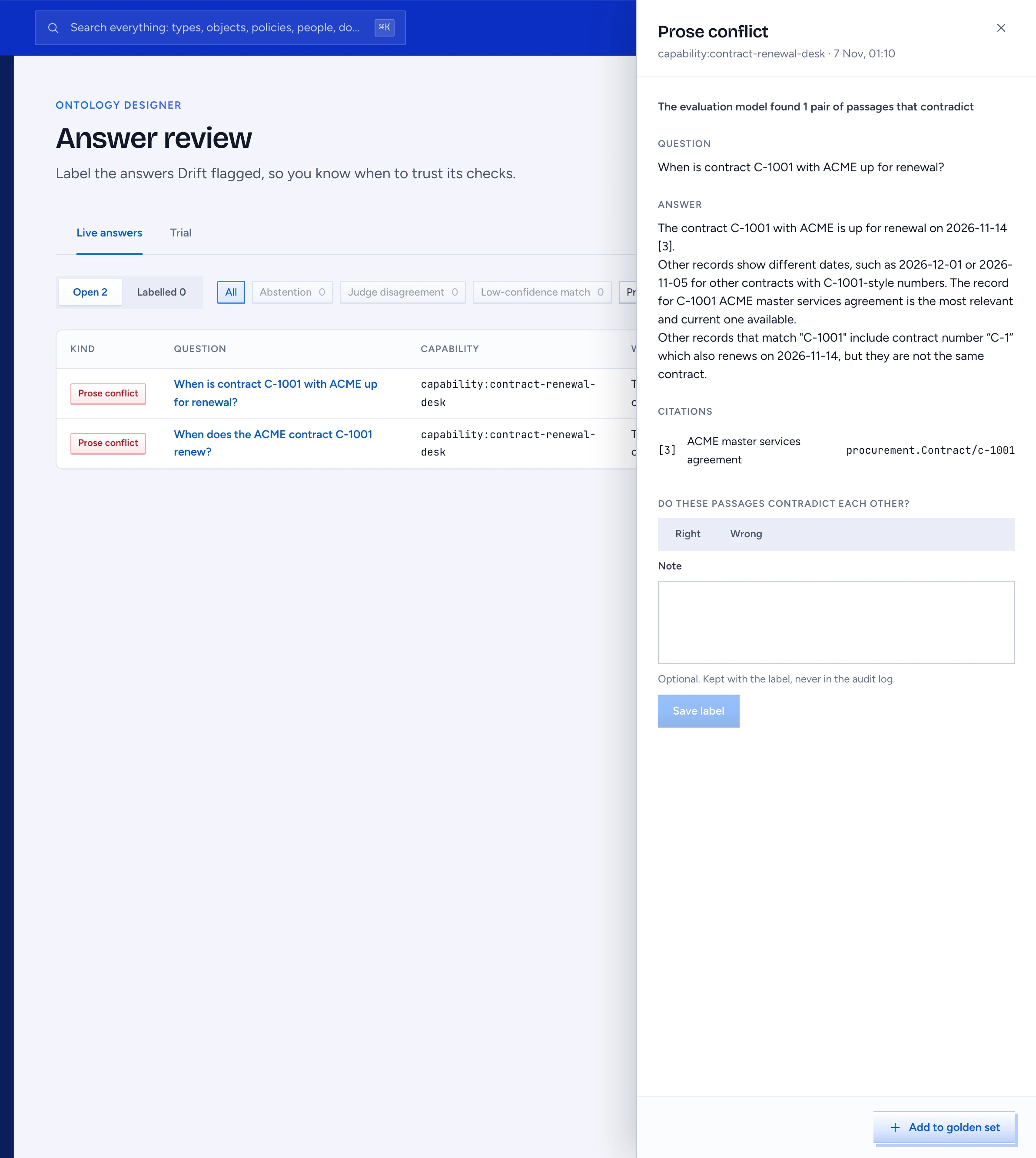
| Prose conflict | A checked answer where the evaluation model found passages that contradict each other. | Do these passages contradict each other? |
At most 20 items of each kind are added per run. An item keeps counts and ids only. Drift never records who asked.
Label an item
- Open Answer review in the designer. Open shows what waits, Labelled what is done. The kind chips narrow the list.
- Select a question. The panel on the right shows the question, the answer, its citations and one line on what Drift saw, for example "The judge disagrees with the reference and finds 1 of 2 facts". For a judge disagreement or a low match it also shows the golden case with its facts and reference answer.
- Choose Right or Wrong. Right means Drift's call was right: not answering was right, the judge is right, it is the golden question, the passages do contradict.
- Add a note if it helps the next reviewer, then press Save label. An item is labelled once.
The label is kept in the audit log as drift.label with the kind, your verdict and the ids. The note stays with the label and never goes into the audit log.
Withheld answers
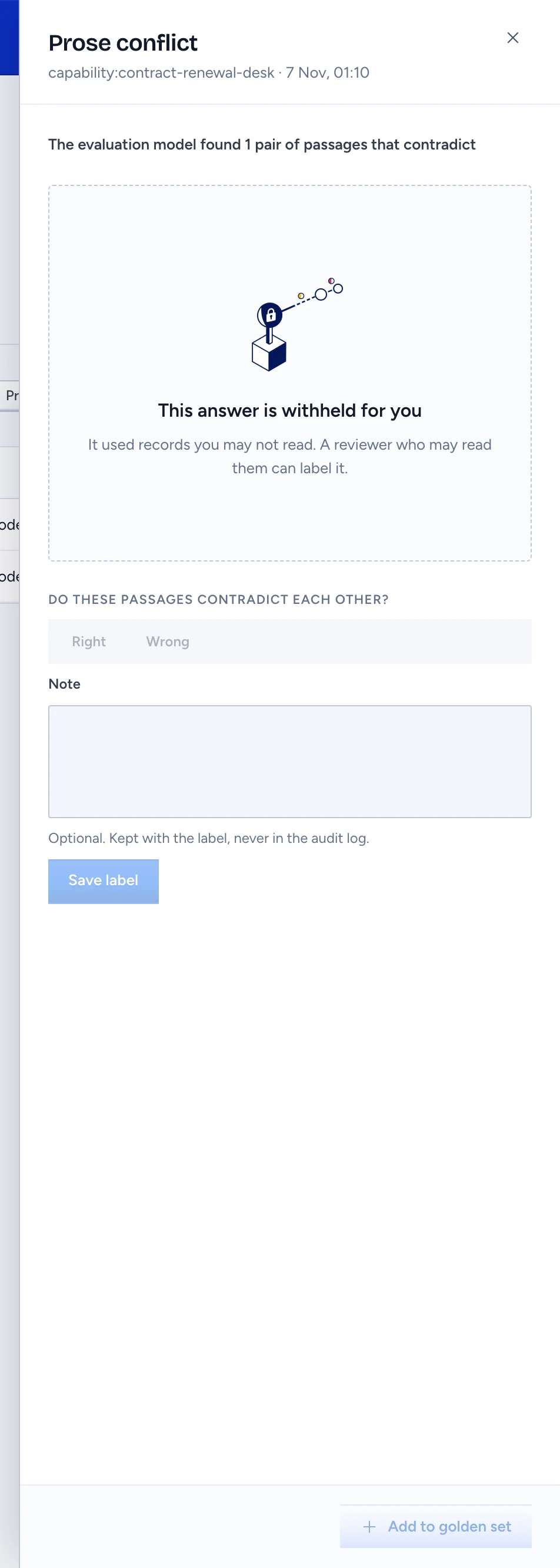
You see the question and the answer only when you may read every record that answer used, as if you had asked the same thing on the same channel and Capability. Otherwise the row says Withheld and the panel says the answer is withheld for you. You cannot label it; a reviewer who may read those records can.
When a record the answer read was updated after the answer (renewed, corrected, synced again), or the asker's own access to it changed, the row says Changed since and the panel says the answer can't be shown as it was. Gluon keeps only which records an answer read and a fingerprint of them, never a copy, so it rebuilds what the asker saw from the records and the asker's access as they are now; when that no longer matches, nobody can see or label the answer, and the golden case and any label note are hidden too. Newer answers about the same records land in the queue as usual.
Otherwise you see the answer only when you see every property of its records at least as well as the asker did: shown where they saw it, and shown or under the same mask where they saw it masked.
Trial failures
The Trial tab beside Live answers holds the failures of a synthetic-world trial, never mixed with live answers. After a trial, synth triage <world> --results <file> --trial-tab gives every failed question a cause and the place its fix goes, and sets each failure aside here.
- Open Answer review and choose Trial. Each row shows the question, its question id, the cause triage found (for example Leak, Not retrieved, Stale ACL), where the fix goes and the trial's verdict. The chips narrow the list by where the fix goes: Gluon, Package, Master data or Question seed.
- Select a question. The panel shows the question, the answer and its citations, and what the trial found: what was expected, the verdict, the cause and where the fix goes.
- Choose Right if the cause is right, Wrong if it is not, then press Save label.
Withheld answers work as for live ones. A trial failure has no Add to golden set: a world's golden set comes from synth golden.
What your labels change
Drift's review group on the evaluation run counts your labels per Capability over the week:
- judgeCalibration: of the judge disagreements labelled, the share where the judge was right.
- proseConflictPrecision: of the prose conflicts labelled, the share that were real.
Under the minimum sample the metrics show insufficient evidence. Until enough labels exist the judge is not calibrated, and the Drift report says so.
Add the question to the golden set
Press Add to golden set in the panel. The golden set editor opens with a new case: the question, the cited records as live Type/key references and the Capability are filled in. You choose the Test and its subject, then save the case into your proposal.
You need the console's review permission for this screen.