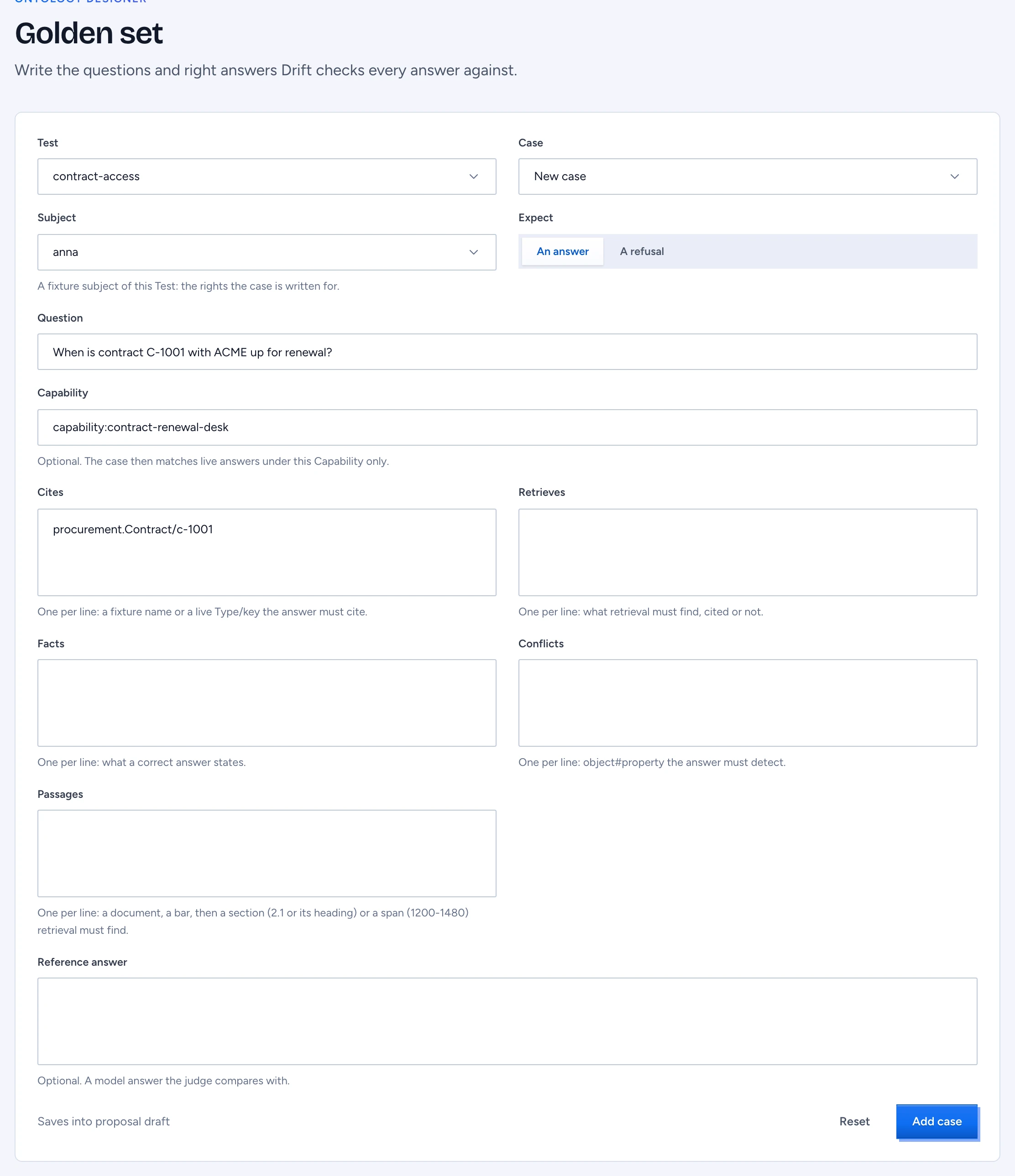
The golden set is the list of questions with known good answers that Drift scores your deployment against: retrieval, key facts, citations and conflicts. Each golden question is a case under answers: in a Test. The Golden set screen in the designer edits those cases as a form, so you do not have to write the YAML by hand.
Add a case
- Open Golden set in the designer, or press Add to golden set on an item under Answer review or on an answer's trace page in chat. From there the question, the cited records and the Capability are filled in.
- Under Test, choose the Test file the case belongs to. Case shows New case.
- Choose the Subject: one of the Test's fixture subjects. The case is written for that subject's rights, never for the person who asked in chat.
- Write the Question and choose whether you Expect an answer or a refusal.
- Fill in what Drift checks, one entry per line:
- Cites: what the answer must cite, a fixture name or a live record as
Type/key, for exampleprocurement.Contract/C-1001. - Retrieves: what retrieval must find, cited or not.
- Facts: what a correct answer states.
- Conflicts:
object#propertypairs the answer must detect, for exampleprocurement.Contract/C-1001#renewalDate. - Passages: the passages retrieval must find, as a document, a bar, then a section or a character span:
corpus.Document/D01 | 2 Arbeidsduur en werktijden(a heading's text, or its number such as2.1) orcorpus.Document/D01 | 1200-1480(the characters from 1200 up to 1480). A section whose heading reads like a span, such as2025-2026, goes in double quotes. A line that reads as neither, or a span that does not end after it starts, stops the save and the field says how many lines to fix. A retrieved chunk that overlaps the span or sits under the section counts, so the label stays valid when the document is chunked again.
- Cites: what the answer must cite, a fixture name or a live record as
- Add a Reference answer if you want the judge to compare with one, and a Capability if the case should match live answers under that Capability only.
- Press Add case.
A case that names live records is scored with the real model and retrieval; one that names fixtures only stays a CI check. See section 15 of the GOL specification for the rules.
Edit a case
Choose the case under Case. Change what you need and press Save case. Only the fields you changed are written: comments in the file, the order of keys and the fields the form does not show (such as neverMentions or the rest of the case's context) stay as they were. Reset returns the form to what the file holds.
Where the change goes
Saving writes the Test file into the open proposal, like every other designer edit. The footer names the proposal. Validation runs as you save: a cite that names no fixture or a conflict on a property the type lacks shows in the Problems panel. The case reaches Drift's scheduled runs after the proposal is merged and published.
Open a case's passages
A case can label the passages its answer must rest on, in the Passages field above: a live document (corpus.Document/<id>) with a section or a character span. A cite or retrieve of corpus.Document/<id> counts too, as the whole document. Open a passage under the lists shows each one, as the form holds it now; click it to open the document inspector in the side sheet, with the passage boxed on its page and its first chunk read out. Open in the inspector opens the same document in the admin console, with the chunk list beside the pages. A document you may not read says withheld in the sheet. A label by fixture name opens nothing: it only counts as a CI check.
When you view the designer as someone else, the form is read-only. If no Test exists yet, create one with a fixture subject in the designer first.