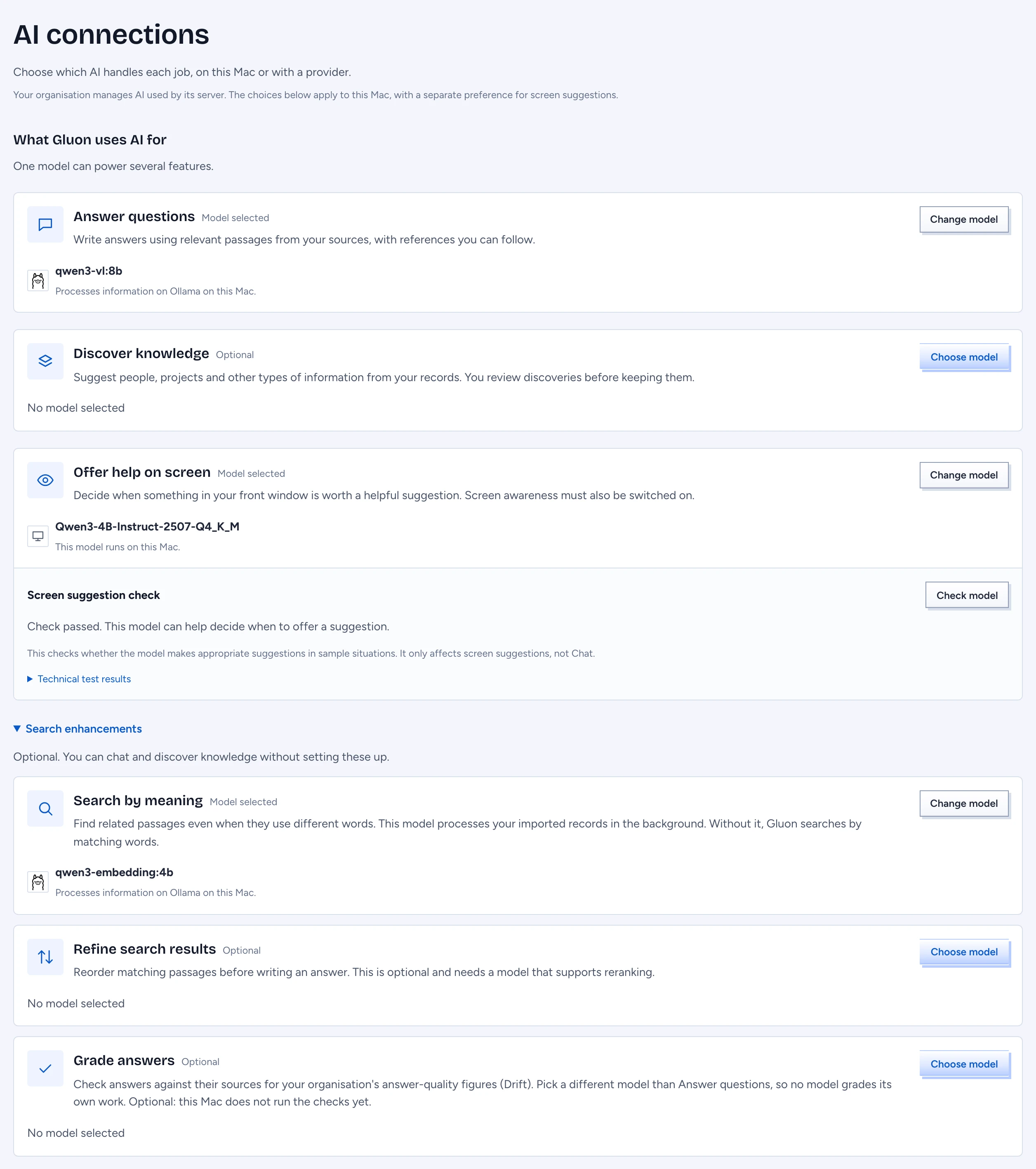
AI connections: choose the AI behind each thing Gluon does. An AI connection is a service, or a model file on this Mac, that Gluon may send text to: a model on this Mac, Ollama, or a key you own. For each job, such as Answer questions, you choose the Model it uses. Local engine: Gluon Desktop can download a model, run it inside the app with llama.cpp, and check whether it may suggest help on screen. Open it from Settings › AI connections.
The line under the title says whether the Mac is linked. Linked, your organisation's model settings stay in charge of the work its server does; your choices cover the work done on this Mac, with a separate preference for screen suggestions.
Each card names where the information is processed: "Processes information on this Mac", or at the provider's address. Check it before you choose a remote service: the question and the passages it found, or the records Gluon reads to discover knowledge, go there.
Start with a model for Chat
Until Answer questions has a model, a banner says "Start with a model for Chat". Do one of two things:
- Download a model under Download a model, then choose it under Answer questions.
- Press Add connection to use Ollama, a key you hold or another provider, then choose it.
The other jobs can wait. Answer questions is marked Start here; the others read Optional until you choose a model.
Choose a model for each job
The cards under What Gluon uses AI for:
| Card | Used for |
|---|---|
| Answer questions | answers in Chat, with references you can follow |
| Discover knowledge | suggested types from your records; you review them in Knowledge |
| Offer help on screen | whether the assistant offers help for what is in your front window |
| Search by meaning | finds related passages with different words. Under Search enhancements. Without it Chat searches by words only |
| Refine search results | puts the 50 best matching passages in a better order before the answer. Under Search enhancements. Optional. Needs a connection that serves reranking (an OpenAI-compatible server with a /rerank endpoint, such as LiteLLM or a llama.cpp server); a model that does not answer within 3 seconds, or cannot rerank, leaves the order as it was and the answer's trace says why |
| Grade answers | the model that checks answers against their sources for your organisation's answer-quality figures (Drift). Under Search enhancements. Pick a different model than Answer questions. Optional; this Mac does not run the checks yet |
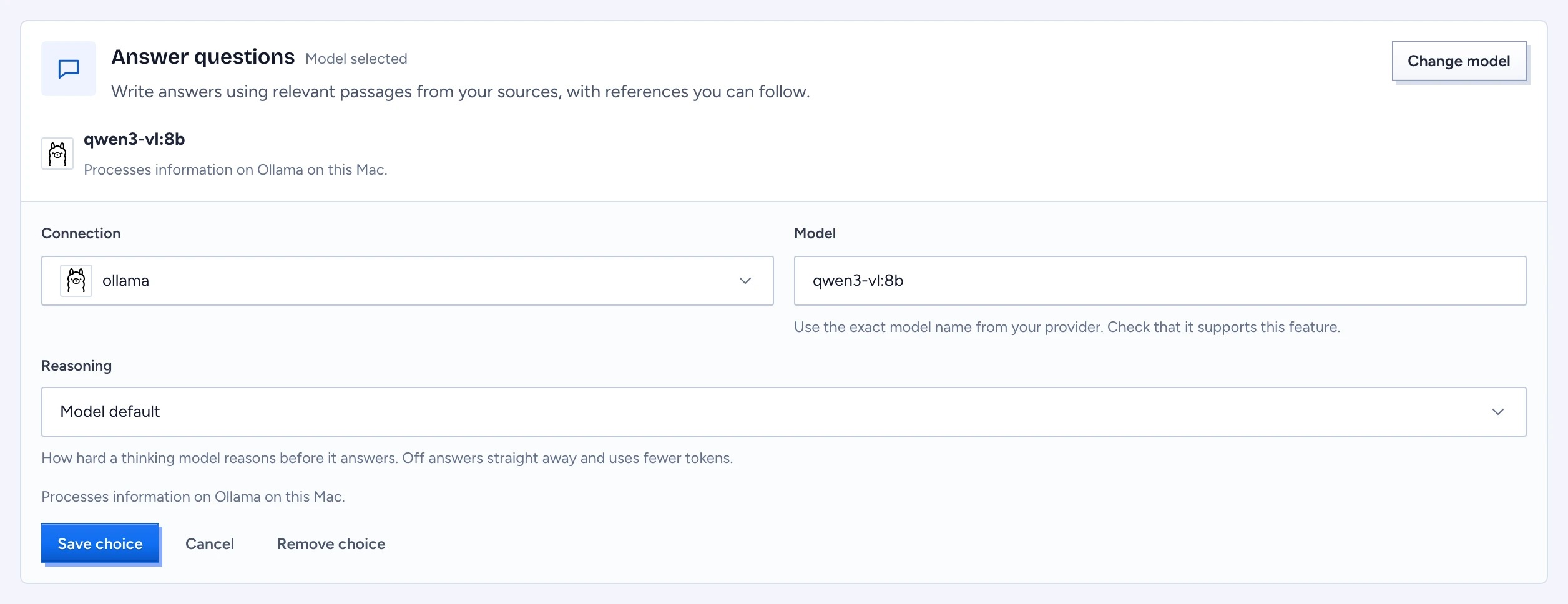
- Press Choose model on a card (Change model when one is set). The card opens.
- Pick a Connection. The list leaves out connections that cannot serve the job: screen suggestions need a local model file or a System One server, and a System One server serves nothing else. A local model file is offered for search jobs too, but cannot do them yet (below).
- Type the Model name, exactly as the provider spells it. The connection's last check offers its model names as suggestions. For a local model file there is no name to enter: Gluon uses the model in the file.
- For Answer questions, Discover knowledge and Grade answers, Reasoning sets how hard a thinking model reasons: Off answers straight away and uses fewer tokens, Model default leaves it to the model. The card then shows "Reasoning: Off".
- Press Save choice. Cancel closes the card. Remove choice clears the job. A failed save keeps what you typed.
A card with a model says where it runs: "Processes information on this Mac." Chat over your records needs Answer questions; searching by meaning needs Search by meaning. The embedded llama.cpp does not embed yet, so use Ollama or another service for that.
Linked: use this model for screen suggestions
On Offer help on screen, while you are linked, the switch Use this model when connected to my organisation decides who handles screen suggestions. On: your own model, through its connection (on this Mac for a local model file), once it passed the check. Off: your organisation; the card says "Your organisation currently handles screen suggestions." The switch does not touch Chat or knowledge discovery. Not linked, a model that passed always decides.
Add a connection
-
Press Add connection under Your AI connections.
-
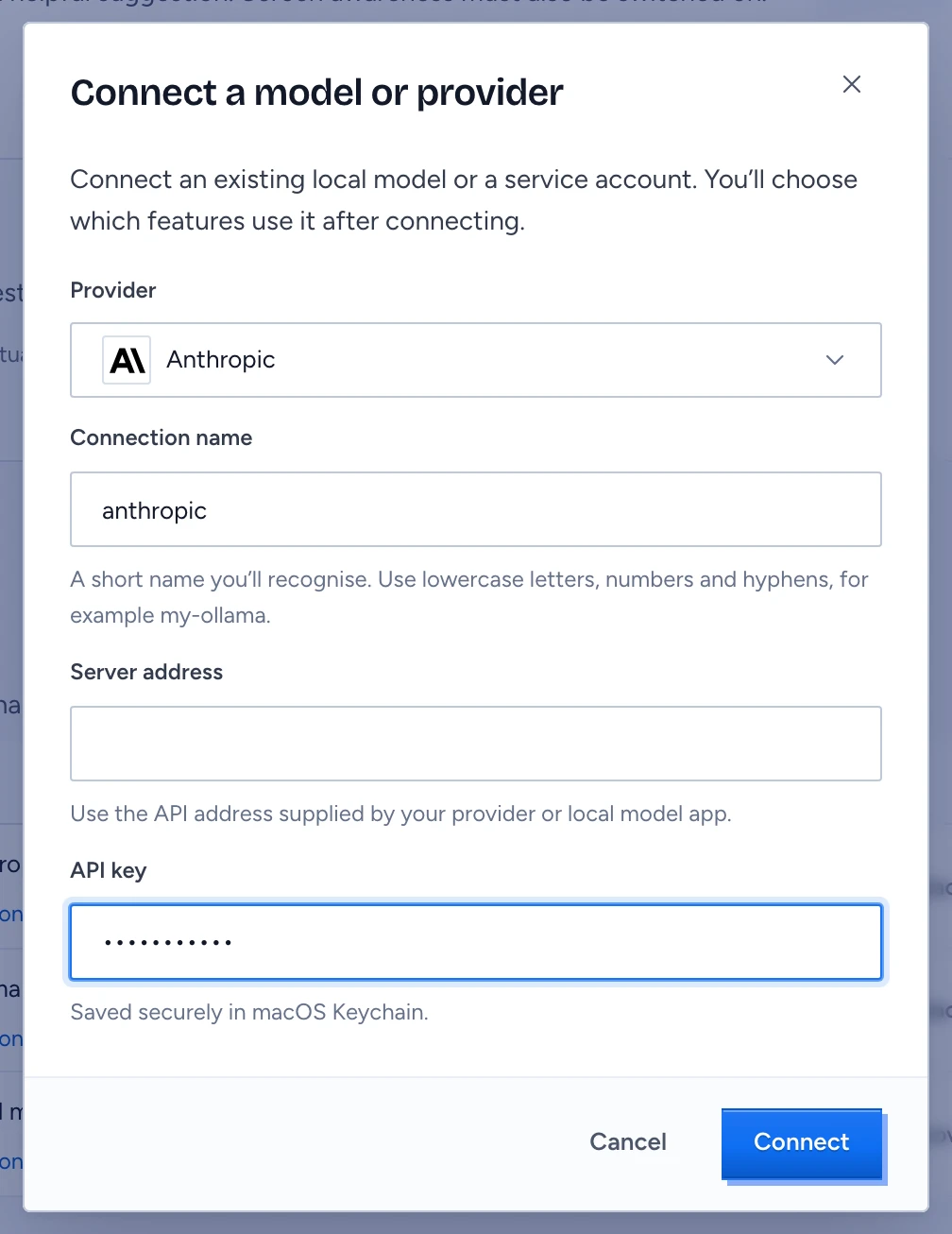
Choose the Provider:
Provider Give Serves Local model file the full path of a .gguffile, for example one Ollama or LM Studio already downloadedanswers, discovery, screen suggestions Ollama its address, such as http://127.0.0.1:11434all but screen suggestions OpenAI-compatible service its address, and a key when it needs one all but screen suggestions System One server its address (a Kev, Clef or other server that speaks the System One contract) and a key screen suggestions only Anthropic, OpenAI your API key all but screen suggestions -
Give it a Connection name: lowercase letters, digits and hyphens, such as
my-ollama. -
Press Connect. A key goes to the macOS keychain, never into the app's database; the table shows only a hint of it. The toast says "Connection added. Choose a feature to use it." Adding a connection changes none of your choices.
An address must be on this Mac or a public address; a private network address is refused. A model file path must be absolute and point at a real GGUF file.
Check, replace the key or remove
- Test asks the connection for its models. Connected means it answered; Could not connect shows the error it gave, such as
401 invalid x-api-key; Not checked yet means no test ran. Connection details shows the address or file and the key hint. - Replace API key takes effect at once. Revoke the old key at the provider afterwards. A local model file has no key.
- Remove asks first: the saved key is deleted and the connection is taken off every job that used it. Those jobs need another model.
Connections running on this Mac are marked On this Mac.
Download a model
Download a model lists the models Gluon Desktop can download, with their download size:
- Press Download. The state shows the progress, then Checking download while the file's SHA-256 is compared with the published one, then Installed. A file that does not match is deleted; press Retry.
- The finished file becomes a local model file connection. Choose it for Answer questions or Discover knowledge. If it passed the Screen suggestion check in Gluon's own tests and you have no choice saved for Offer help on screen, Gluon chooses it for that job too.
Downloads use disk space and take minutes. Gluon Desktop keeps them in the model folder under Privacy & storage.
The Screen suggestion check
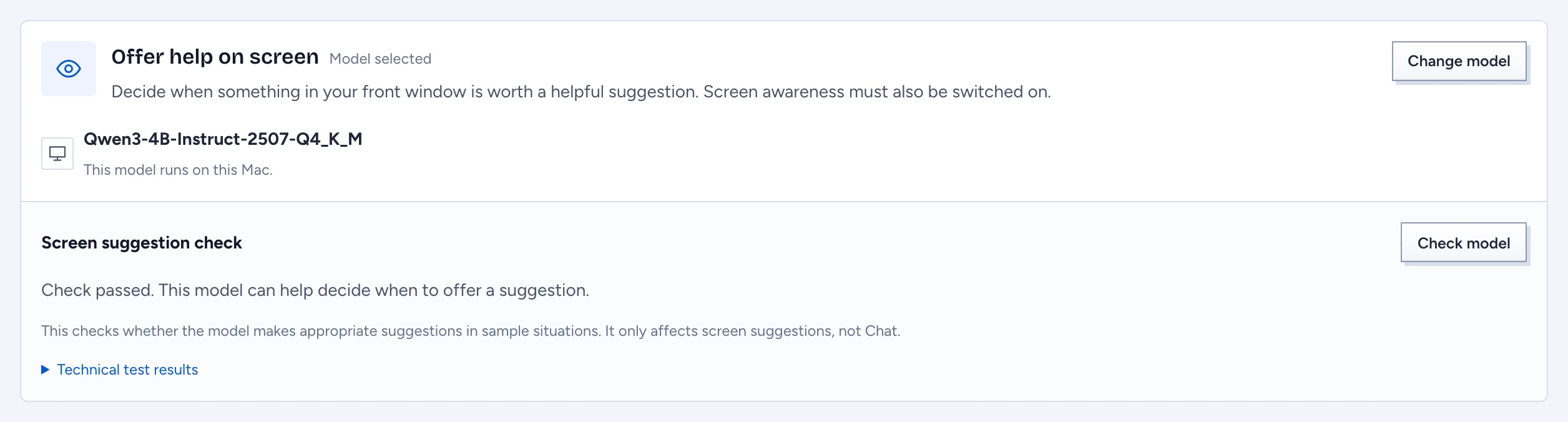
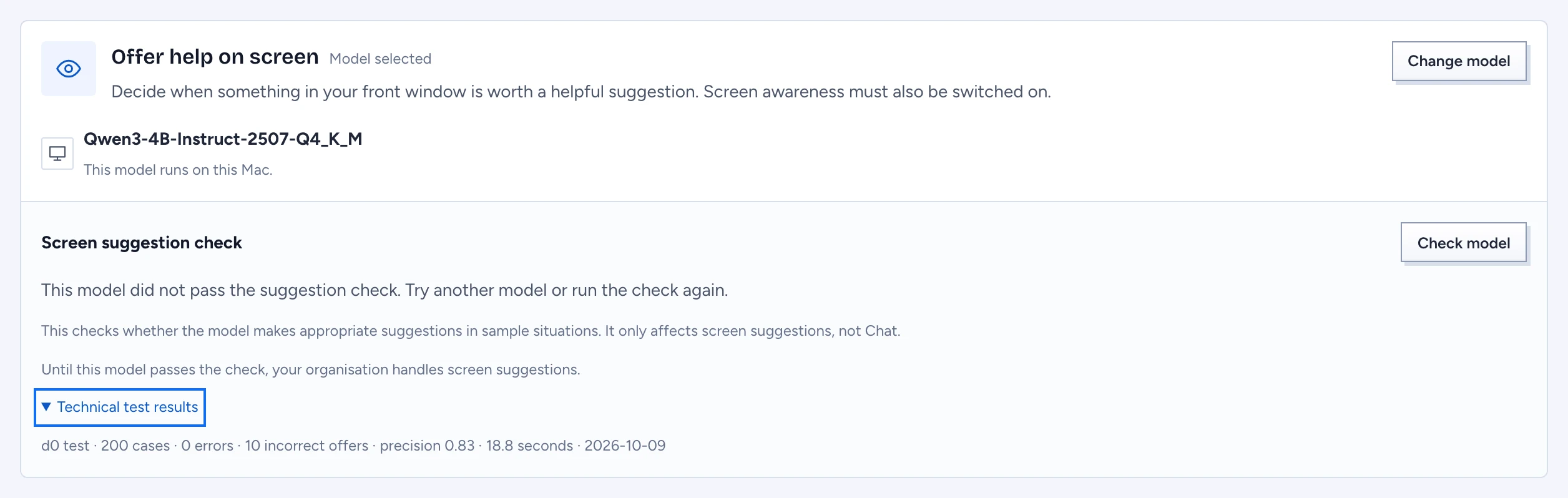
A model must pass a fixed test before it may decide when the assistant offers help. The test is 200 sample screens with the answers a good decision must give. A model passes with no errors, no incorrect offers (an offer where none should be made) and a precision of at least 0.90. It affects only screen suggestions, never Chat.
On Offer help on screen, press Check model to run it on the model you chose; it takes a few minutes and the card says "Checking sample situations." The result is kept per model.
| The card says | Meaning |
|---|---|
| Check passed. This model can help decide when to offer a suggestion. | the assistant may use it |
| This model did not pass the suggestion check. | until it passes, built-in rules decide on this Mac; linked, your organisation decides |
| Check this model before using it for screen suggestions. | not run yet; handled as not passed |
| Choose a model to enable AI-powered screen suggestions. | no model chosen; handled as not passed |
Technical test results shows the raw line: cases, errors, incorrect offers, precision and seconds ("d0 test"). On the development Mac, Qwen3 4B Instruct 2507 passed (110 offers, none false, about 43 seconds) and Qwen2.5 1.5B Instruct did not (10 false offers).
Other states
- Choose where your AI runs: no connections. Download a model, point at a model file, or add a service.
- This version of Gluon cannot run local model files.: a build without llama.cpp; use Ollama or a key.
- Could not load your AI settings: the service did not answer; press Retry.
- Could not save this change: an action failed; the message under it names the reason when the service gave one.