Playground: shows what the assistant would see and do, without watching anything. Input: paste screen text. Recogniser: same as the assistant uses. Output: records and types found from your pack, known field labels, and the vector a decision receives. Linked state: cloud answer shown beside the Mac answer.
Use it to try a pack, to understand an offer the assistant made, or to show someone what leaves the Mac.
Recognise a screen
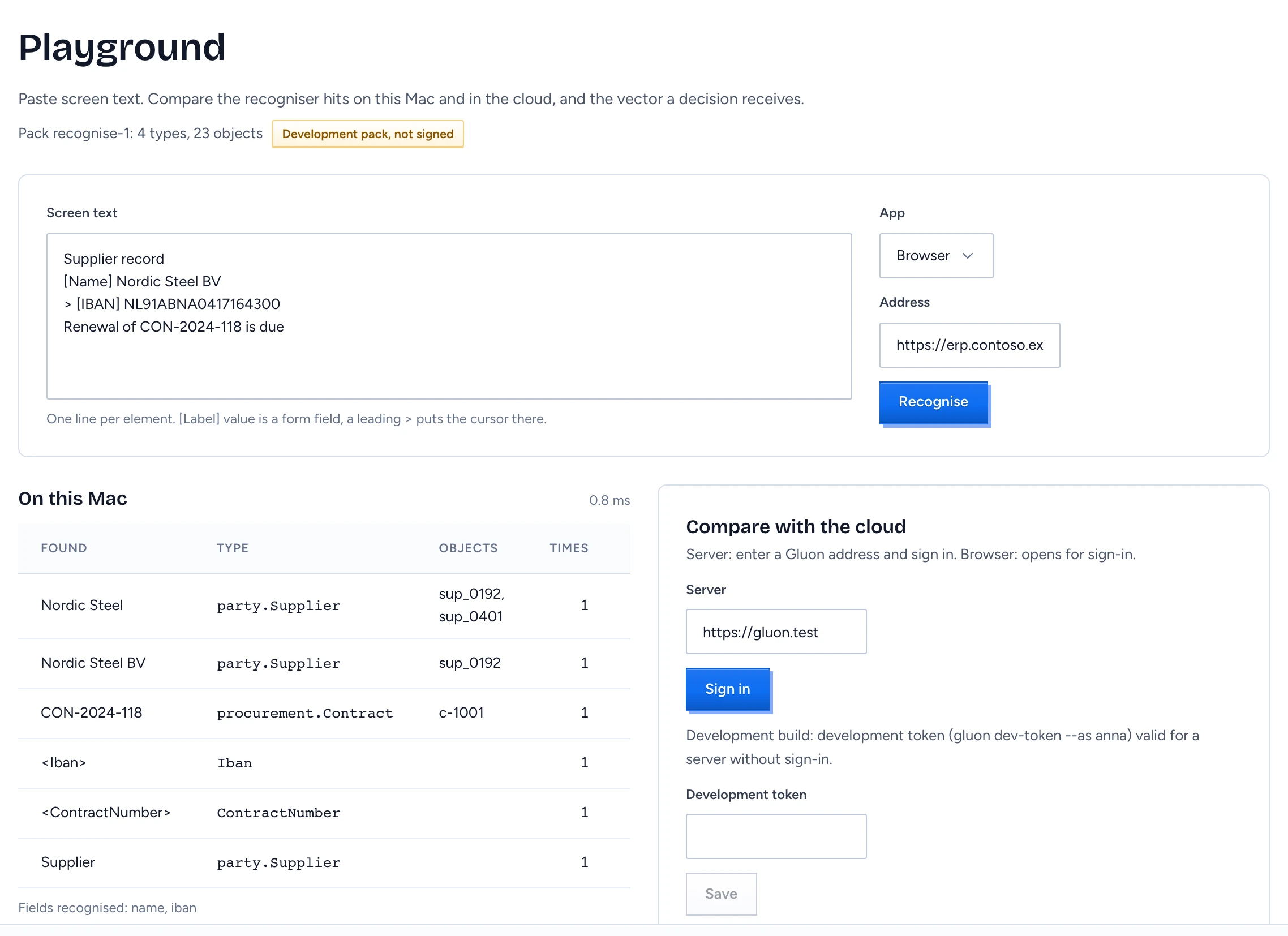
- Open the Playground: menu bar Develop › Recognition Playground, or Settings › Develop › Recognition playground. The line under the title names the pack: "Pack revision: n types, n objects". Development pack, not signed means the app's own pack is in use, not a signed pack from your server.
- In Screen text, type or paste what the screen shows, one line per element:
[Label] valueis a form field, such as[Name] Nordic Steel BV.- A leading
>puts the cursor in that element, such as> [IBAN] NL91ABNA0417164300.
- Pick the kind of App (Browser, Mail, Document, Spreadsheet or Other) and, for a browser, the page's Address. Both go into the vector; the address only counts when its host is one your pack knows.
- Press Recognise.
On this Mac lists the hits:
| Column | Shows |
|---|---|
| Found | the text that matched |
| Type | the pack type it belongs to |
| Objects | the record ids it may be (several when two records share a name) |
| Times | how often it appears on the screen |
| In focused field | Yes when the cursor is in that element |
Under the table, Fields recognised lists the field labels your pack knows, as property names. The recogniser returns at most 8 hits: records first, then value patterns such as an IBAN, then bare mentions of a type.
Compare with the cloud
Linked to a server (see Link Gluon Desktop to your Gluon server), the Cloud column shows the server's hits for the same screen and pack, with its time. A green Same hits badge means the Mac and the server found exactly the same; Hits differ means they did not, which is worth reporting. The server answers only when it runs in development mode; otherwise the column says the cloud did not answer.
Not linked, the Cloud column shows Compare with the cloud. Sign in under Settings › Account (see Link Gluon Desktop to your Gluon server); the Server field and Sign in here start the same sign-in. A development build also takes a development token here (gluon dev-token) for a server without sign-in; release builds ignore it.
Read the vector
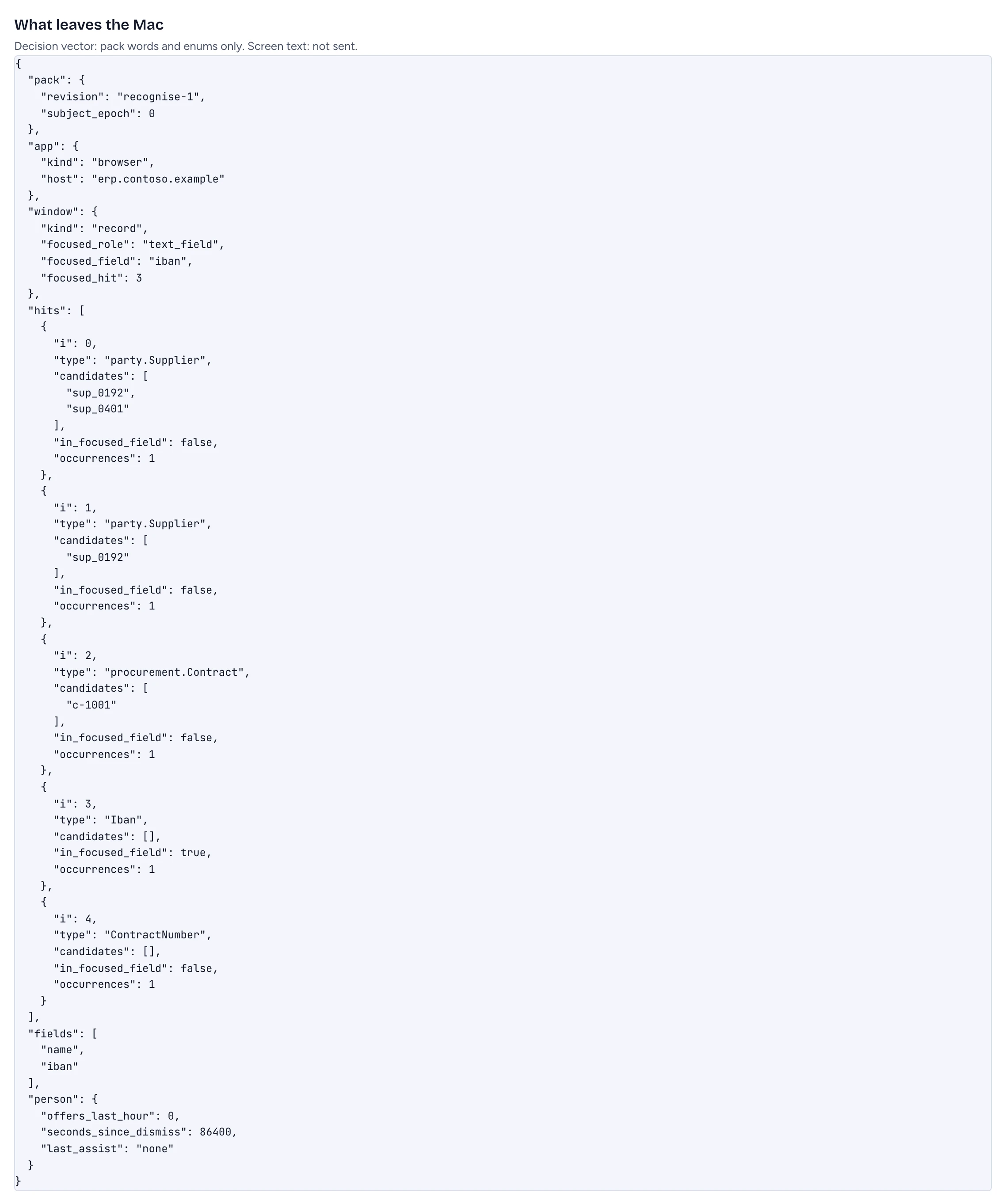
What leaves the Mac shows the vector as JSON. It is built from your pack's words and fixed categories only: the kind of app and window, the focused element's role, the type and record in the focused field, the hits by type and record id, and the recognised field names. The text on the screen is never part of it. Linked, this is all the cloud receives to decide whether to offer help.
Decide
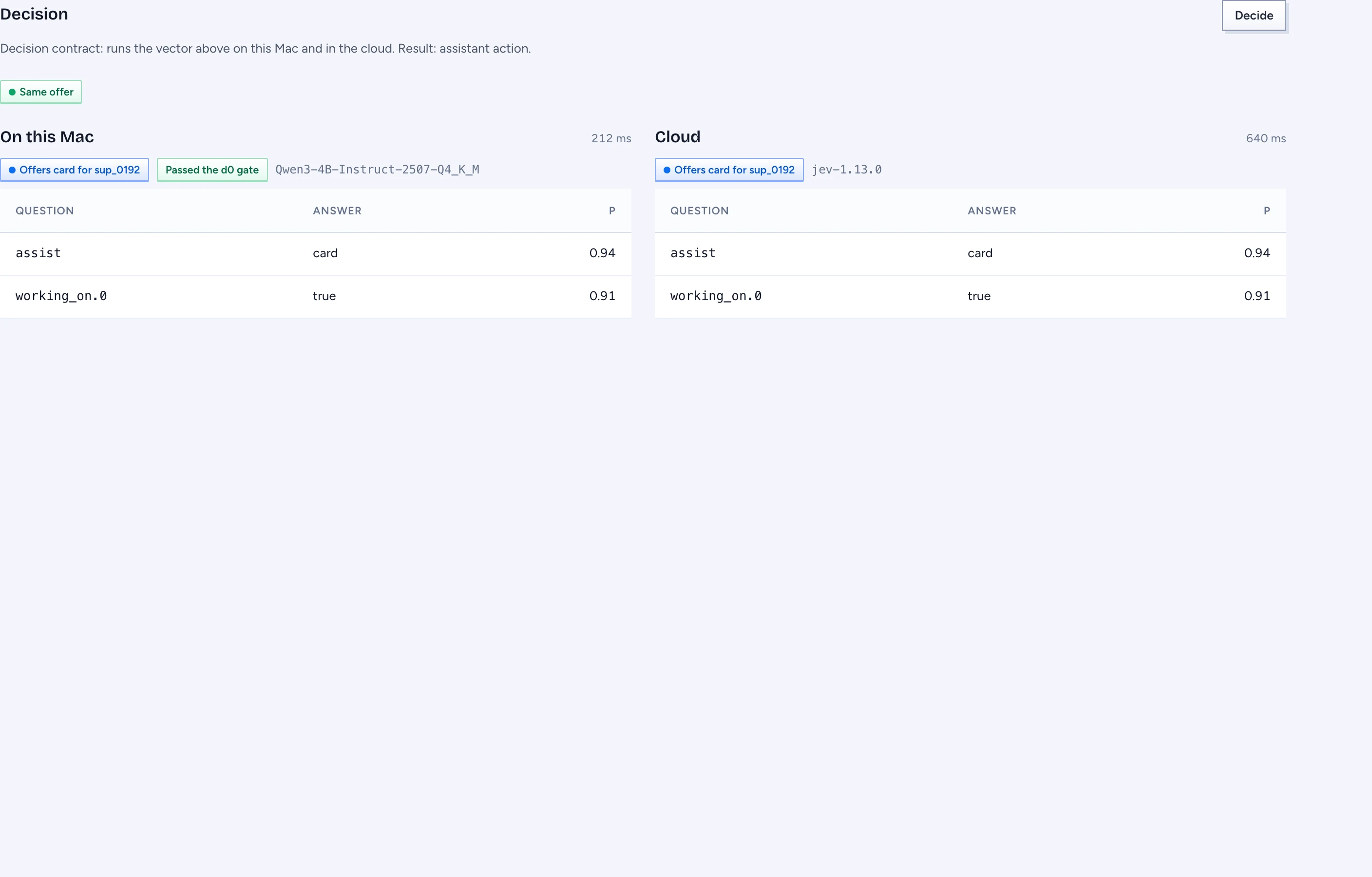
Press Decide under the vector. Gluon Desktop sends the vector to the decision lanes and shows each one's answer side by side:
- On this Mac: your decision route's model, marked Passed the d0 gate (the Screen suggestion check on AI connections) or Not gated: shown here only. The Playground runs a local model even before it passed the gate, so you can see how it would decide; the assistant does not use it until it passes.
- Cloud: the server's decision for the same vector, read with the same rules.
Each lane says what the assistant would do: "Offers card for sup_0192", "Would show a picker for card, which never pulses" (it is not sure which record you mean), or No offer. Below it, every question the model answered, with the answer and its probability. Same offer or Offers differ compares the two.
| Message | Meaning |
|---|---|
| Decision vector: not available. Recognise a screen first. | press Recognise before Decide |
| No decision route. Set one on the Models screen. | no model is chosen for Offer help on screen under AI connections |
| Gluon server: not linked. | the Cloud lane needs a sign-in; sign in under Account |
| Pack revision: cloud differs from this dev pack. | the server's pack moved on; recognise again with the current pack |
| The vector names something the pack does not have. | the vector does not match the pack it was checked against |
| Model: no valid answer in time. | the model answered late or out of shape |
| Decision route: model did not load. | the GGUF file is missing or does not load |
When the Playground cannot run
- Open this in the Gluon app: you opened the page in a browser tab. The recogniser runs in the app's service, which a tab cannot reach.
- Local service: did not start: the app could not open its port. The log in
~/Library/Logs/com.gluon.desktopsays why. - Local service: no answer: the service is up but failed this request. Press Retry.