Skills: instructions Gluon follows for one kind of question: what to read, and how to answer. On the Mac every skill is yours. Each one is a file in your knowledge folder (skills/<name>.yaml), checked against your knowledge types every time you save it, so a skill that names a type you renamed or removed is refused with the reason.
Open it from Settings, then Skills, or press New skill under My skills in the sidebar.
Start a skill
- Press New skill.
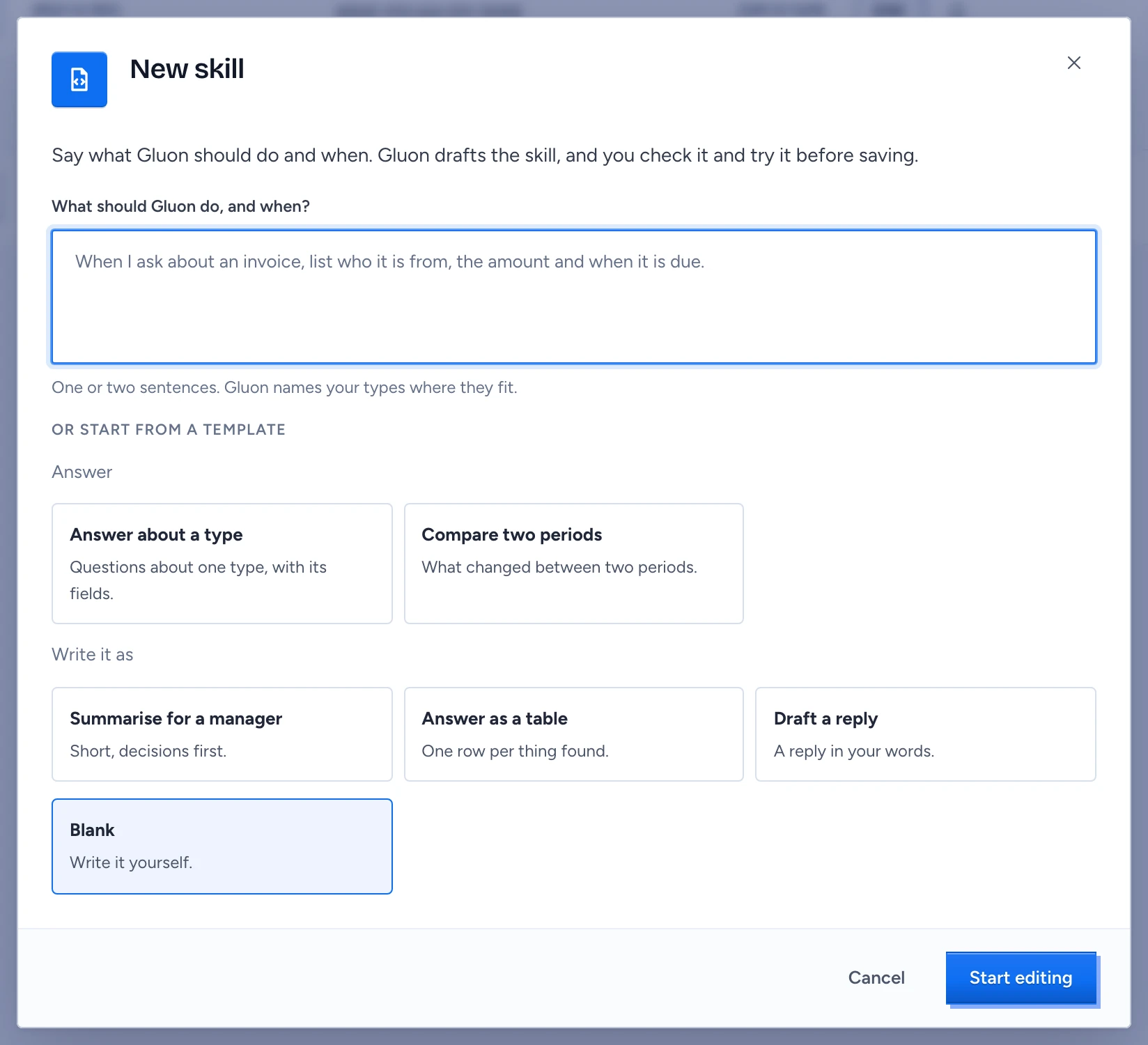
- Under What should Gluon do, and when?, say it in a sentence or two, such as "When I ask about an invoice, list who it is from, the amount and when it is due".
- Press Draft skill. Gluon drafts the skill with your chat model, naming your knowledge types where they fit, and opens it in the editor with an example question ready under Try this draft. Nothing is saved until you press Save.
Without a chat model, Gluon could not draft it says so: set one up under Models, or use a template.
To start from a template instead, leave the sentence empty and pick one under Or start from a template: Answer has Answer about a type and Compare two periods, Write it as has Summarise for a manager, Answer as a table and Draft a reply. Each one is about a type, so About appears: pick the type, such as Mail. Blank needs no type. Press Start editing. Without types in your knowledge only Blank is offered; the empty Skills page then has Open Knowledge, where you accept a type.
Edit and save
The first form asks for the name, what the skill is About, When it applies (example questions) and the Instruction in plain words; {{mail.Mail}} names a type. Evidence, checks, citations, the preview and the YAML file are under Advanced, closed at first. Press Save. When the file does not check out, Not saved says why in the validator's own words, such as an unknown reference.
Try is off for now: trying a skill comes with the next Gluon update. Save it and pin it in Chat meanwhile.
Use a skill
Press Use in chat on a skill, or pick it under My skills in the sidebar. The question box shows it until you clear it, and every question you ask meanwhile is stored with the skill's name.
Remove a skill
Press the bin on its row and confirm. The file is deleted from the Mac.
Other states
- No skills yet: start from a template.
- Skills did not load: press Try again.