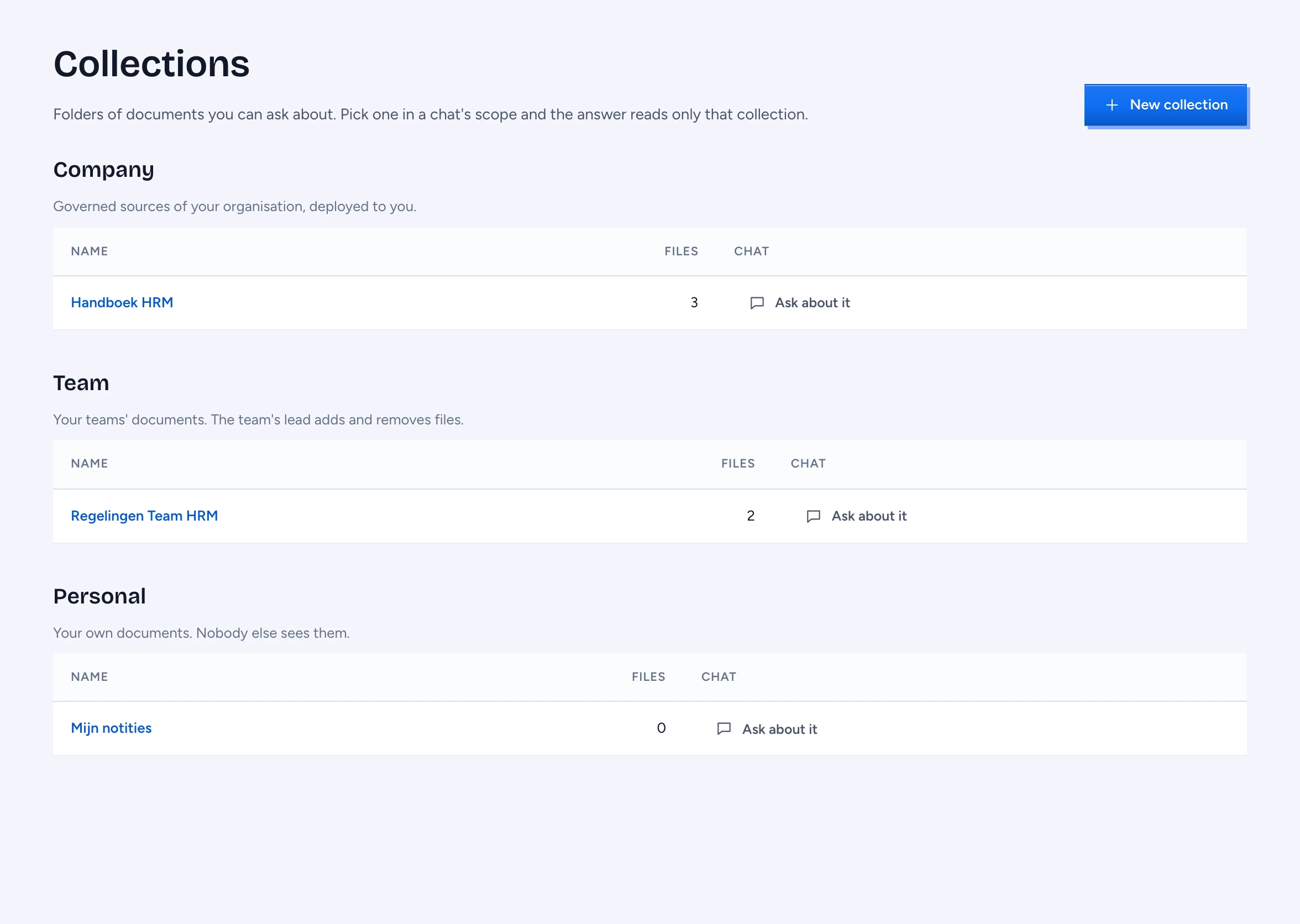
A collection is a folder of documents you can ask about. There are three kinds. A company collection is a source your organisation governs and deployed to you. A team collection belongs to one of your teams: its lead adds and removes the files, and the team's members read it. A personal collection is yours alone. Every file in every collection is read the same way: PII is masked, each passage is checked against your access before an answer uses it, and every change is in the audit log.
Open Collections
Click Collections at the bottom of the chat sidebar. The page lists the collections you may read under Company, Team and Personal, each with how many files you may read. Someone else's personal collection, or a team collection of a team you are not in, is never listed, and its address says This collection is withheld from you.
Create a collection
- Click New collection.
- Under Owner, keep Only me for a personal collection, or choose a team you lead. Only a team's lead makes its collections; an administrator sets the leads on Admin › Groups, and a lead who leaves the team loses these rights at once.
- Type a Name and, if you like, Instructions (see below).
- Click Create. The collection's page opens.
Add and remove files
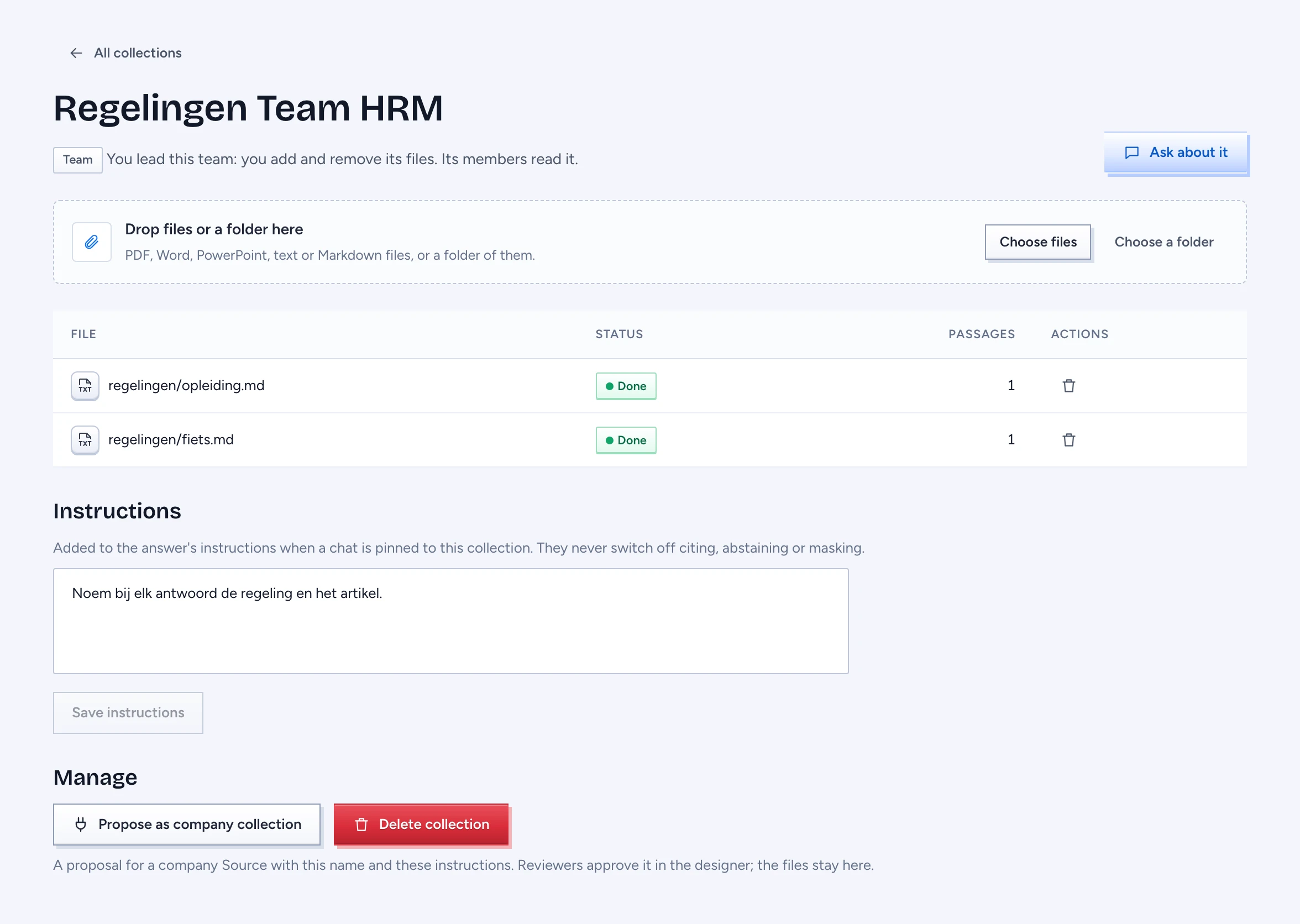
On the collection's page drop files or a folder on the drop zone, or click Choose files or Choose a folder. A collection takes PDF, Word (.docx), PowerPoint (.pptx), text (.txt) and Markdown (.md) files; other files are left out, and the page says how many. The file shows as Queued, then Reading, then Done; only then can you ask about it. Failed says why the file could not be read. Adding a file with the same name again replaces it.
To remove a file, click the bin on its row. It is gone at once and purged from the index soon after; answers that cited it lose those citations. A file that is still being read cannot be removed, or uploaded again under the same name, until it is done; a collection cannot be deleted while any of its files is being read.
Only the owner of a personal collection, or a lead of the team, sees the drop zone, the bin and Manage. A team member sees the files and instructions read only.
Give a collection instructions
Under Instructions, write how answers from this collection should read, for example "Always name the article number". They are added to the answer's instructions when a chat is pinned to the collection. They never switch off Gluon's own rules: answers still cite their passages, say when the documents do not answer, and mask personal data. Text that tries to give the model other orders is cut out. Click Save instructions.
A company collection takes its instructions from its source (ai.prompt in the ontology), added whenever an answer uses its passages.
Ask a collection
Click Ask about it on a collection, or pick it in the composer's scope (it is marked Collection). The chat is pinned to that collection: the answer reads only its passages, and only the ones you may read. Follow-up questions in the same chat stay pinned. A collection you have just made can take a moment to appear in the scope: until it does, the composer says Opening the collection… and sends nothing, so a question never reads wider than the collection. Without a pin, an answer reads every document you may read, your collections included.
Make it company material
A team or personal collection is not reviewed. To make it a company collection, click Propose as company collection under Manage. Gluon writes a proposal for a new source with the collection's name and instructions, readable by the same team or person until reviewers change it, to the designer's draft, where reviewers approve it like any change. The files stay in your collection; once the source is approved and deployed, they are uploaded to it. You need the right to propose changes in the designer.
Delete a collection
Click Delete collection and type its name to confirm. Its files are gone at once and purged from the index. It cannot be undone.