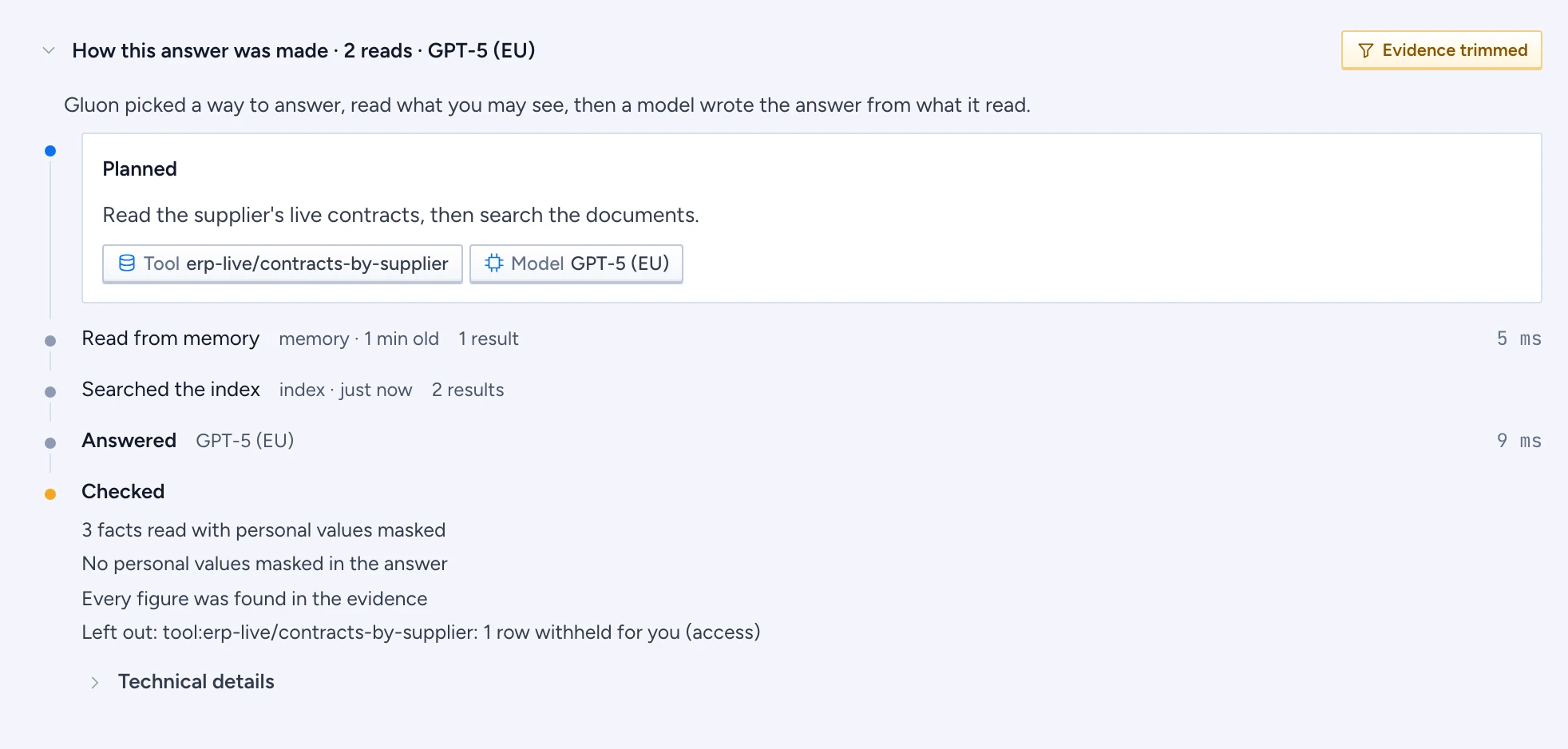
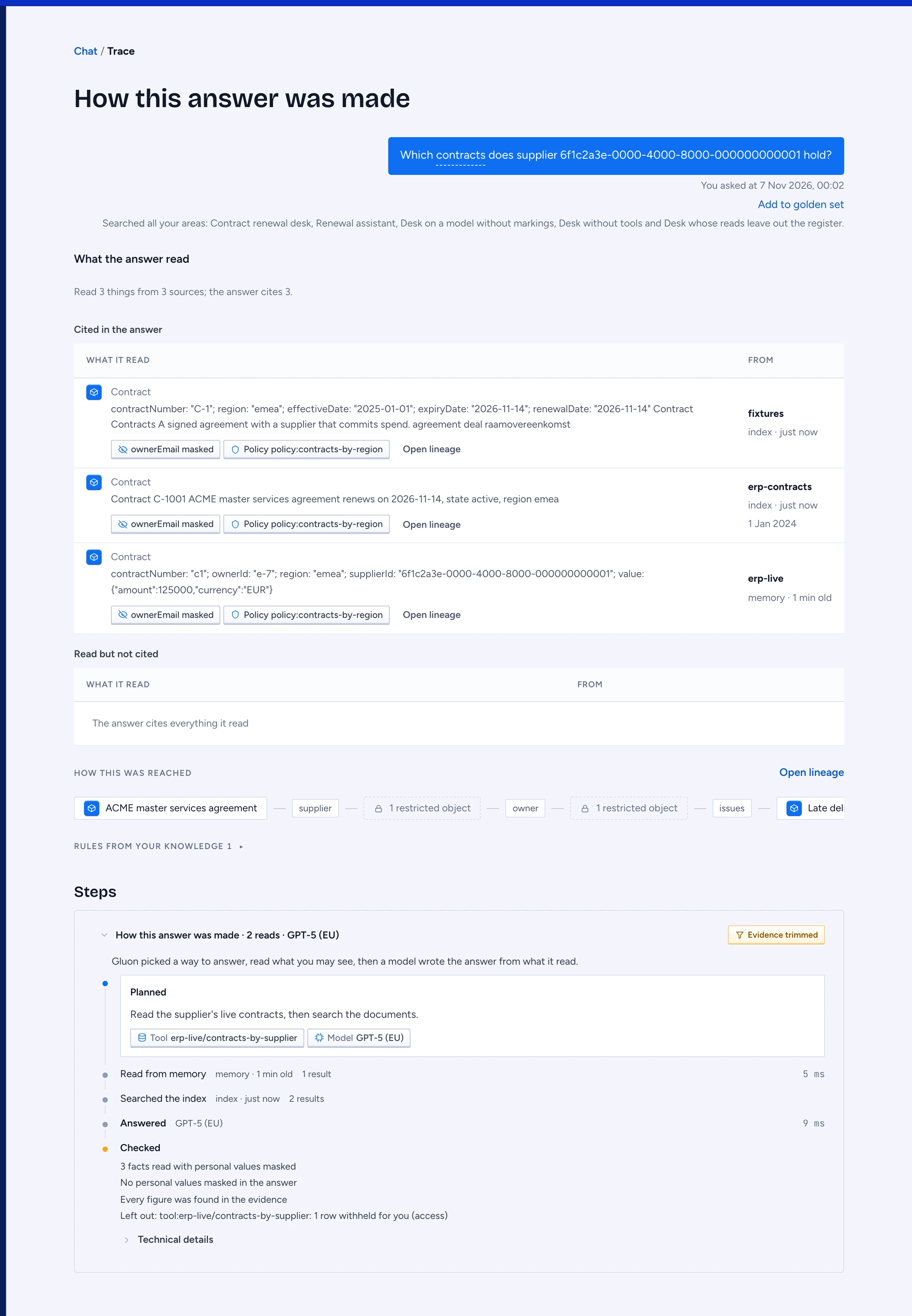
Every answer keeps a record of how it was made: which plan Gluon chose, what it read and from where, which model wrote the answer, and what was checked before you saw it. Gluon measures each number in this record itself. The model does not report them. Press Explain, at the top right of the answer, to open it: the answer's trace page, the one place an answer is explained in full. While an answer is still coming, its progress shows under it.
Read the trace row
The trace page shows what the answer read first, then how it was reached and the rules it was held to, and the steps last, under Steps, folded to one row: press the row to open the steps. That row sums up the answer in one line, for example "How this answer was made · 2 reads · Claude Sonnet".
- Reads counts what Gluon read to answer: a live system, memory or the search index. Each one counts once.
- The last part names the model that wrote the text you see, by its title, such as GPT-5 (EU).
When the answer used something Gluon kept, the answer's header says From memory, 4 h old, beside Explain, (the age of the oldest kept result it used) and offers Refresh. Refresh asks the same question again with every read live and replaces what Gluon kept; the new answer shows no memory line.
Beside the row sits at most one badge, the one that weakens the answer most. Each is two words with an icon; point at it, or Tab to it, for a line that says what it means:
- Read failed: Gluon could not read something it needed. The answer may miss what that source holds.
- Check failed: a check of the skill did not pass, for example "Open items were not read".
- Unchecked numbers: the answer has a number that no fact it read contains. Check it before you use it.
- Evidence trimmed: some facts did not fit and were not used.
- Maybe outdated: a fact was older than its source allows and could not be read again, or, on an answer you open later, a record it read has changed at the source since.
- Details masked: personal values were masked before the answer reached you.
No badge means nothing needs your attention.
While the answer is still arriving, the row says what Gluon does at that moment, for example "Reading open-receivables(customer: Acme)…" or "Writing the answer…".
Open the steps
Select the row to open the steps. A sentence on top says how every answer is made: Gluon picks a way to answer, reads what you may see, then a model writes the answer from what it read. Then one row per step:
- Planned is always first. It says in plain words why Gluon chose this plan, and shows chips for the skill, the tools and the model.
- Each read says what kind of read it was (Read a live source, Read from memory, Searched the index), where it came from (live, or memory or index with its age), how many results came back and how long it took. A failed read is red and shows its error. A second try is marked retry.
- Answered names the model that wrote the answer.
- Checked lists how many facts Gluon read with personal values masked (before the model saw them), the personal values masked in the answer itself, figures that no fact contains, facts that were left out and why, and the checks of the skill. After a cited answer it also says how many claims the claim check found word for word in their sources, or that it could not check them.
- Technical details, closed at first, shows each call as it was made, for example
open-receivables(customer: Acme), with its time, the tokens and cost of each model (its title, then its reference, such asmodel:eu-gpt-5-2026-08), and the total time.
Open the trace page
Press Explain at the top right of the answer. Under your question, What the answer read comes first, with a line such as "Read 6 things from 2 sources; the answer cites 2", and one row per thing the answer read. When it read the same file or email more than once, that is one row with the count, such as "2 records".
- What it read shows the thing with its icon (a Word, Excel, PowerPoint or PDF file shows its own icon, an email the mail icon): its name, its type, a few of its words, and what was masked for you, such as "ownerEmail masked". Security officers also see the policy names. Ids and stored fields are not shown here: Open lineage has them.
- From names the source with its logo, whether it was read live or from memory or the index, and how old it was. A stale dot marks a fact past its window. When you open an older answer, Gluon compares each record it read from the index with the copy it holds now; a record that reads differently is marked changed at the source since, so you know the answer may no longer hold. Gluon does not call a source again for this: live and kept reads are judged by their window. Which tool read it is in the steps above. Under it, the record's own date when it has one: updated 10 Mar 2026 is when the source last changed it, a plain date is the record's own date. Opening the fact shows the same date beside its source.
- Open lineage opens Where this came from for that fact.
- Open on page shows on a fact from a Word, PDF or PowerPoint file: it opens Where this came from with the file at that page and the passage boxed (see Inspect citations, objects and lineage).
The facts come in two tables: Cited in the answer, the facts a numbered cite in the answer points to, and Read but not cited, what Gluon read and gave the model but the answer does not cite. A long list under Read but not cited often means the search found more than the question needed.
Rules from your knowledge, with its count, opens, when you press it, the types the answer was held to, one sentence each: what the type is, its fields, and what it links to. Gluon gives these rules to the model with the question. They show only the fields and links you may see. Press a type's name to open it on the ontology map in the designer, in a new tab. You see it there only if you have access to the designer.
Gluon checks the trace against your access each time you open it. A fact you may no longer see is not shown: the page counts it as withheld instead. When you open a chat that someone shared with you, you see the summary rows only, not the plan or the calls.
"This trace isn't here" means the chat was deleted or is not shared with you.
Debug an answer (test environments)
On a test environment where the server runs with GLUON_DEBUG_TRACE=1, every answer shows Debug beside Explain. Press it to open the answer debugger, a window over almost the whole screen. It shows everything Gluon did for the answer, for every user, policy names and full prompts included. On other environments the button is not there.
- The header names the request, how the plan was made, and when it started and ended. When you asked the same question again, the attempt list at the top switches between the attempts, oldest first, and a line says what changed against the attempt before.
- A row of numbers gives the total time, the model calls, the tokens, the cost, the facts kept of those read, the policy checks, the repeats and the claims still unverified.
- Flow shows each step on a time line: picking the area, the plan and each repair of the plan, every read with its retries, the search and its reranking, the packet, the answer, the checks. Steps that ran at the same time overlap. Judge claims shows the second model call that reads the sentences the claims check could not back: each one is a fact, a value worked out from the records, or a note such as a caveat. A note is not checked as a claim. A fact counts as backed only when the records it points at hold its words, figures and dates. Select a step to see why it ran, its values, and what it kept and left out with the reason. A step that called a model links to that call. Under the time line, Considered and used lists the areas, skills, tools, sources, types, models and facts Gluon looked at, what it used and why it left the rest out.
- Policy decisions lists every access decision: what it was about, permit, mask or deny, and the policy.
- Context packet lists every fact read, kept or left out, with its source, where it was served from and its age.
- LLM calls lists every model call with the provider's logo. Select one to see each message sent, with its role and tokens, the response as the model gave it (formatted when it is JSON), and what Gluon did with it. A structured parameter, such as the JSON schema the reply must follow, folds under the call's settings; open it to read it formatted. Models that were not offered the question are listed under Not called with the reason.
- Raw shows the whole record as JSON. Copy JSON copies it.
Use a skill of your own
Your own skills are listed under Skills at the bottom of the chat sidebar: select Skills to open the list. Select one to use it for the questions that follow: it shows as a chip above the question box, and the trace's Planned row names it. Select the chip's cross to stop using it. New skill opens a new personal skill in the admin console: a short form with the instruction and example questions. See also Inspect citations, objects and lineage.