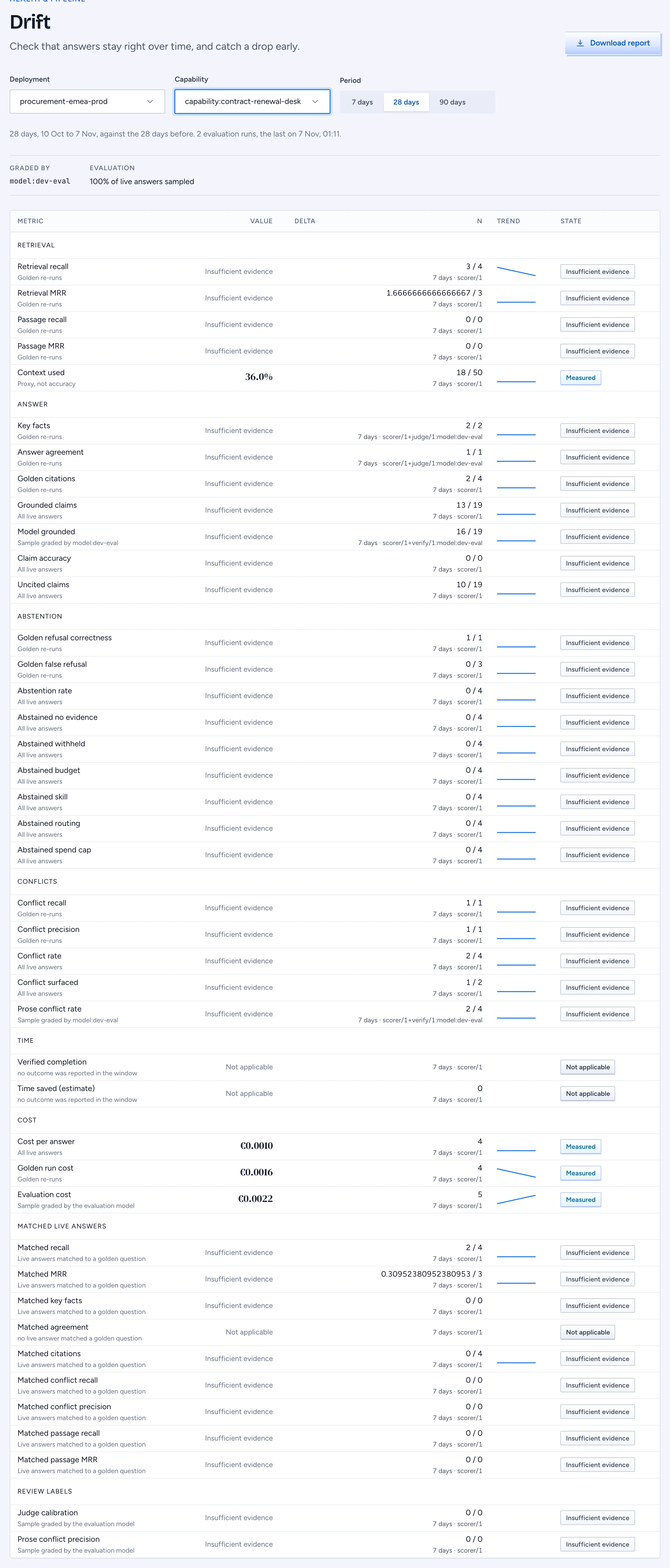
Drift shows whether Gluon's answers stay right over time. It reads the same evaluation runs as the scorecards, per deployment and Capability, and shows each number with its trend. It never adds numbers into one score.
Open Drift
- In the admin console, open Health & pipeline > Drift.
- Pick the Deployment. The screen opens on the first one.
- Pick a Capability to narrow the numbers to one intended use, or keep All Capabilities.
- Pick the Period: 7 days, 28 days or 90 days. Every delta compares the period with the same number of days just before it.
The line under the pickers gives the period, the number of evaluation runs in it and when the last one ran.
Read the metric table
Each row is one metric, grouped as Retrieval, Answer, Abstention, Conflicts, Time, Cost, Matched live answers and Review labels. A row shows:
- Value: the number for the period.
- Delta: the change against the prior period, with an arrow up or down.
- n: what the value was counted over, for example 23 / 25, then the window and the method (the evaluator version, such as
scorer/1orverify/1:model:dev-eval). - Trend: a small line of the values in the period, oldest on the left.
- State: Measured, Insufficient evidence or Not applicable.
The line under each metric name says where the number comes from:
| Label | What it means |
|---|---|
| Golden re-runs | The golden questions, asked again every night and when the setup changes, through the real model. |
| Live answers matched to a golden question | Real questions close enough to a golden question to be scored against its expected answer. |
| All live answers | Every live answer in the period. |
| Proxy, not accuracy | Context used: the share of the evidence an answer cited. It shows use, not whether the answer was right. |
| Sample graded by model:... | A sample of live answers checked by the evaluation model named. |
Golden re-runs and matched live answers are shown apart and never averaged.
The metrics in plain words
- Retrieval recall and Retrieval MRR: did search find the evidence the golden question expects, and how high did it rank.
- Passage recall and Passage MRR: did search find the passages the golden case labels (a section or a character span of a document, see Write the golden set), and how high the first one ranked. A retrieved chunk that overlaps a labelled passage counts, so the labels stay valid when a document is chunked again. Live answers matched to a golden question show the same two as Matched passage recall and Matched passage MRR.
- Key facts: did the answer contain the facts it must contain. Answer agreement: does the evaluation model agree the answer matches the reference.
- Golden citations: did the answer cite what the golden case expects, and never what it must not. Grounded claims: are the answer's claims backed by the evidence it cites, by word match and, on the sample, by the evaluation model. Claim accuracy: of the claims the claim check read after a cited answer, how many it backed with words quoted from their passage (a quote Gluon could not find in the passage does not count). An answer the check could not read counts for nothing.
- Golden refusal correctness and Golden false refusal: on the real golden run, did Gluon refuse when the case expects a refusal, and only then. Live abstentions are counted per reason.
- Conflict recall and Conflict surfaced: when two sources disagree, did Gluon find it and say so in the answer.
- Verified completion: tasks confirmed done by an Action run or an outcome posted through the API or MCP. A thumbs up never counts.
- Time saved (minutes): an estimate, verified completions times the Capability's baseline minutes, less the time Gluon took. The row names the baseline and whether it was declared or measured.
- Cost per answer, Golden run cost and Evaluation cost: in EUR at the prices declared on each Model, not billed amounts.
Insufficient evidence and not applicable
Insufficient evidence means fewer answers than the minimum sample for that metric. No number is shown, only n, so a thin week never looks like a good or a bad one.
Not applicable means the metric cannot be measured here. The line under the name gives the reason when it is known: No baseline minutes on the Capability for time saved, or No evaluation model is approved for the judged metrics. Gluon never estimates a judged number without an evaluation model.
Check the evaluation strip
Above the table, Graded by names the evaluation models that grade answers, and the strip gives the share of live answers sampled. A warning shows when:
- no evaluation model is approved, so the judged metrics are not applicable, or
department:driftreached its monthly spend cap, so sampling stopped and the judged numbers cover only the answers before the cap.
Both link to Storage and models, where the evaluation models and the spend caps are listed (see Approve models and test routing).
Read the breakdowns
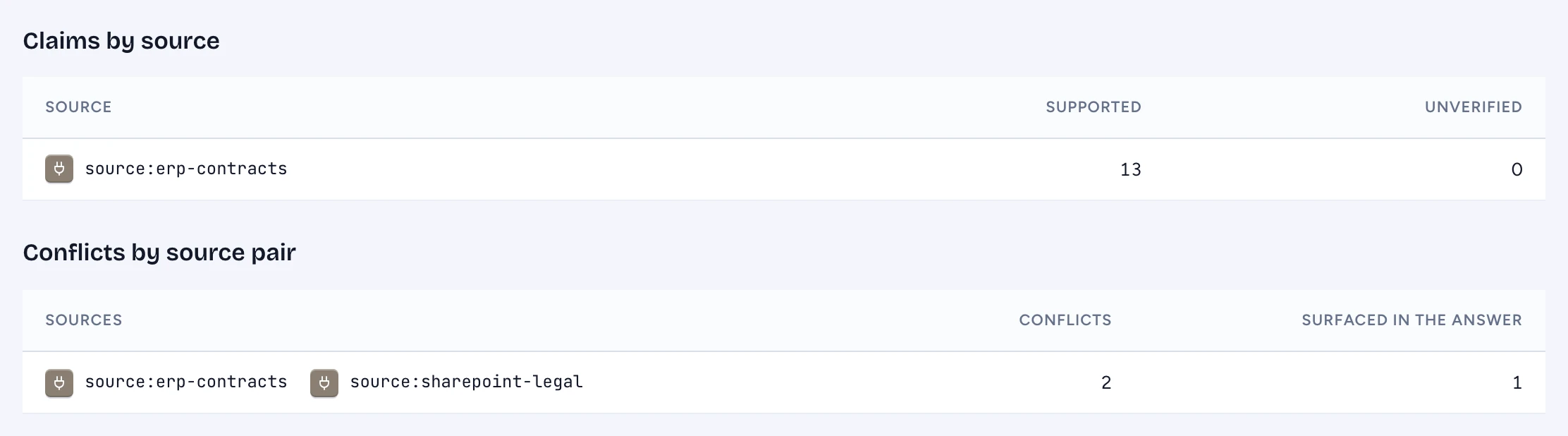
Claims by source gives, per source, how many claims citing it were supported or unverified. Claims without a citation have no source, so they show only as the deployment-wide Claims without a citation rate. Conflicts by source pair gives how often two sources disagreed and how often the answer said so. Each source shows its own mark where Gluon has one.
Download the report
Click Download report. Gluon renders a PDF on the server for the deployment, Capability and period you picked, with every metric, its numerator and denominator, the delta against the prior period and the method notes. Send the file to the sponsor: it opens without signing in because it is a file, and no public link is made. Downloading is recorded in the audit log.
If the download fails, the button says so and you can try again. A role that may not read Drift cannot download the report.
Empty and withheld
With no deployment yet, the screen asks you to deploy a version in the designer first. With a deployment but no evaluation runs yet, it says the first numbers show after the first nightly run. A role without access to Drift sees that Drift is withheld.