Your ontology names logical principals such as department:procurement or team:legal-contracts. They reach nobody until you bind each one to a directory group or user in this environment. A deployment to an unbound principal fails closed, so bind before you deploy.
Bind an unbound principal
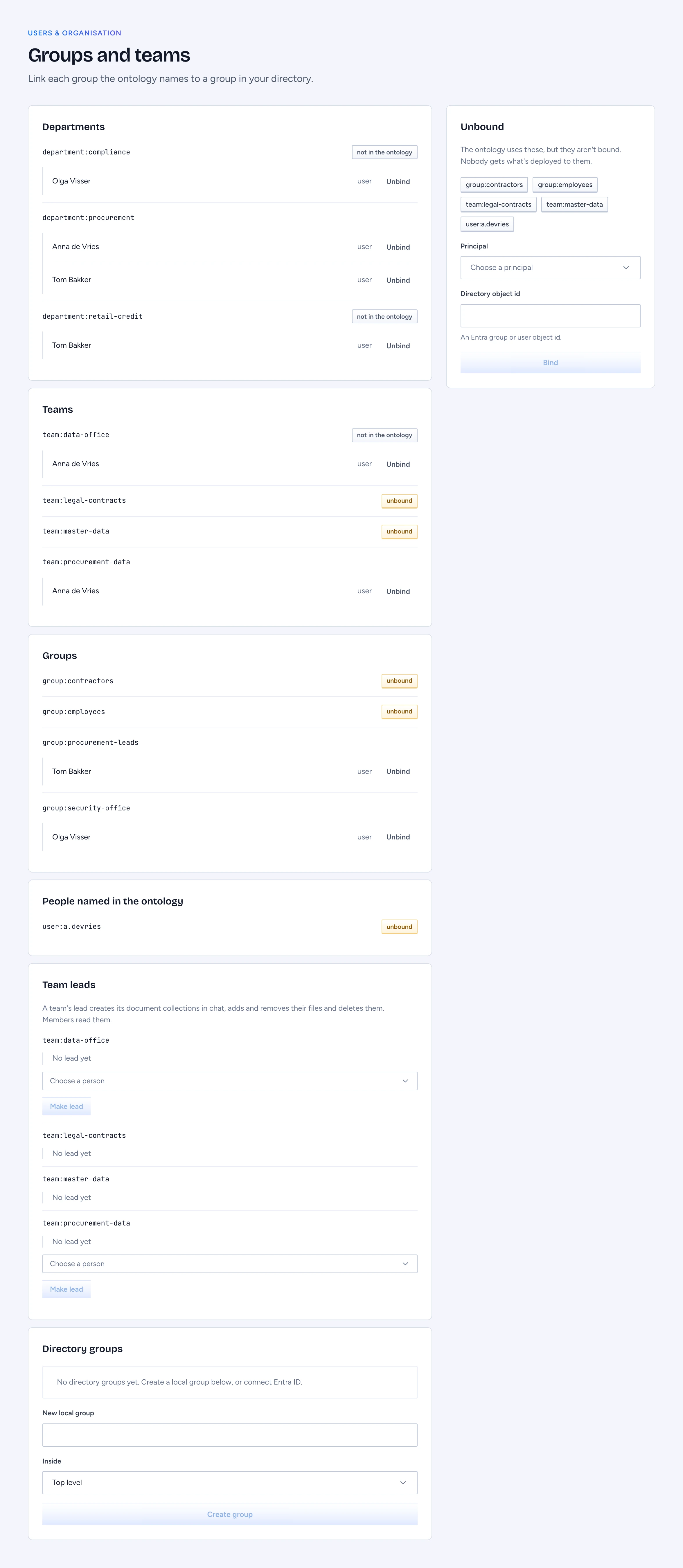
- Open Users & organisation > Groups and teams.
- The Unbound panel lists every principal the ontology uses that has no binding here. The same principals carry an unbound tag in the Departments, Teams, Groups and People named in the ontology lists.
- Choose one under Principal.
- Paste the Entra group or user object id into Directory object id.
- Click Bind.
Members of that directory object hold the principal from their next request. Bindings belong to one environment, so bind staging and production separately. Unbind beside a member removes the binding, and its members stop counting as that principal at once. A not in the ontology tag marks a binding the served package no longer names.
Gluon refuses a binding in two cases. While the directory is stale (15 minutes without a successful pass), bindings and marking grants wait for reconciliation. And you cannot bind a principal that carries an ontology-wide role to yourself or to a group you are in; the attempt is audited.
Set a team's leads
A team's lead creates the team's document collections in chat, adds and removes their files and deletes them; the team's members read them (see Ask a collection of documents). Under Team leads, each team lists its leads. Choose a Person from the members of the directory groups bound to the team, or from the people bound to it directly, and click Make lead; click Remove beside a lead to take it away. A lead acts only in this environment and only while a member of the team. Each change is in the audit log as identity.team-lead. Owners of directory groups are not read from the identity provider yet: leads are set here only.
Build local groups
When a team has no directory group, create one in Gluon.
- Under Directory groups, type a name in New local group.
- Pick its parent in Inside, or leave Top level.
- Click Create group.
Nest ... under moves a group inside another, and members of the inner group count as members of every group around it. The console creates, nests and deletes groups; members are added through the admin API. Groups synced from Graph or SCIM are read only and name their source.
Deleting a group that a policy needs, directly or through an audience, is refused, and the refusal lists those policies. A group with nested groups needs them moved or deleted first.
Grant or revoke a marking
You grant markings per person, from their drawer in People.
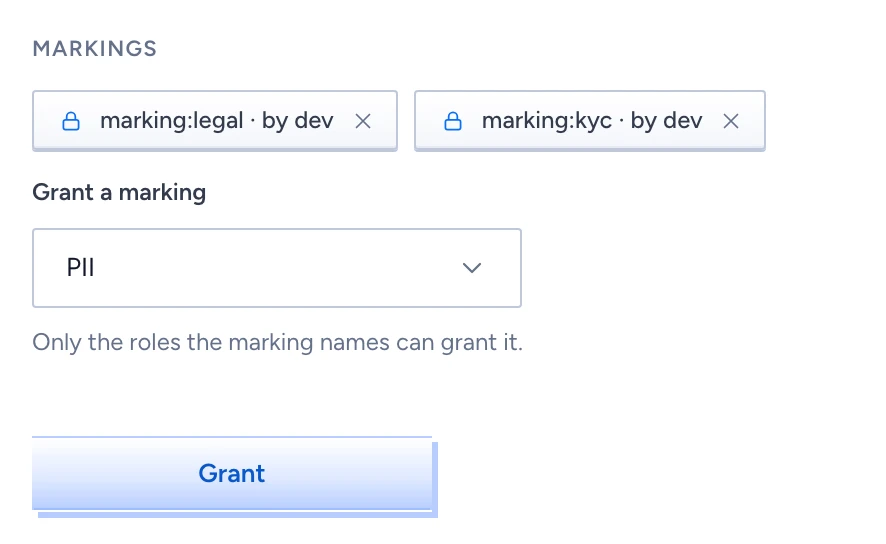
- Open the person. Under Markings, choose one in Grant a marking.
- Click Grant.
Only holders of the marking's grantableBy roles may grant it. Anyone else is refused and the refusal lands in the audit log. Each chip names who granted the marking; the cross on the chip revokes it. Access & governance > Markings lists every marking with its category, what it implies, who may grant it and its holders.
Change a role assignment
Access & governance > Roles lists built-in and custom roles with their scope, permissions and assignees. The list is read only: assignments live in GOL, so you change one with a proposal in the designer. A role never lifts a marking. Someone with the right role who lacks the marking on a type, property or row still has that data withheld.